Future academic years are required.
Past academic years are required.
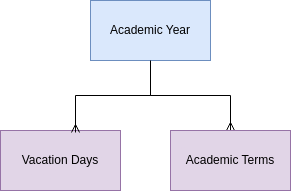
Academic Years have a status field with options of past, future, or current. Also, based on the total number of vacations days, the academic year record calculates the total days in the academic year. This is important since there are many regulations that specify the total number of days in an academic year. ### Fields - The user enters year name, start year, end year, start date, end date, and sequence. - PEMS calculates school days, vacation days. - PEMS updates the status of the year based on the calendar. ### Action Items JAN 20244-MVP | ADVANCEMENT | Automatically create a new academic year record on the promotion date (school configuration variable)
4-MVP | ADVANCEMENT | Automatically update current and next academic year status.
{{@99#bkmrk-calendar-not-started}} # Terms Table **[Terms Table](https://cs.studianova.org/admin/terms)** ### Relevent Topics {{@90#bkmrk-a-term-is-the-divisi}} {{@90#bkmrk-the-names-of-the-ter}} ### School Terms (Terms) Academic terms may be semester, quarters, or any division that the school determines to break up a grading period of the academic year. A record is required for every term the school operates, and for past academic years in order to properly enter the a transfer student's transcripts. Every class a student takes in taken is a specific academic term. Academic terms are related to the academic years, so they can not be created if there is no academic year in the system. In manual operation, The user links the term record to an academic year record by selecting the record. PEMS will implement automation so that school term records are auto-created. ### School Terms Actual Start/End Dates The user specifies a start date and end date for every academic year. In the **term label** record, the user specifies the general day and month that each term is starts and ends. Based on this information term school records are created. After these school term records are created, the user can adjust the specific days of each school term. Future records that have not been updated are considered estimated start days. ### Data Relationships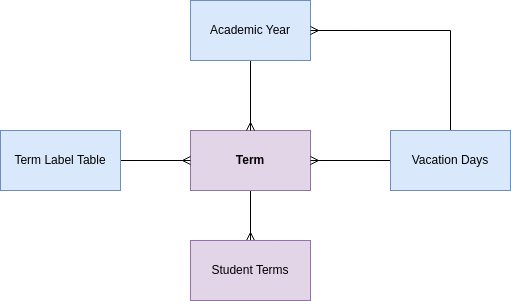
4-MVP | ADVANCEMENT| Auto-**create term records** every time a new academic year record is created per 1.3 Automatically Create School Term Records
{{@99#bkmrk-calendar-functions-n-1}} # Vacation Days Table **[Vacation Days](https://cs.studianova.org/admin/vacationdays)** A Vacation Day record is made for each and every day that school is not in session during any term the school is in operation. Vacation days are not events with a start date and end date, they are specific days. For example, the Christmas holiday may be one school break, but there may be up to ten regular school days not in session, so this required ten records to be entered. A vacation day record is created for all reasons that school is not in session, having no bearing on why. Week ends of days that school is not normally in session do not need to be entered as vacation days. ### Fields **Day** - user enters the date of the vacation day. **Status** - user selects activated or deactivated. This status allows users to turn off vacation days in the planning process with out deleting the information. **Occasion** - user provides a description of why the day is off, such as thanks giving, etc. **Term** - the vacation day to the term in which the vacation takes place. ### Action Items JAN 20244-MVP | ADVANCEMENT | First, Victoria to enter vacation day records, there is no data in the system to perform calculations.
4-MVP | ADVANCEMENT | Related the school term to the vacation day record automatically based on its date and term dates.
4-MVP | ADVANCEMENT | Status - set default to 'activated'
### Next VersionOccasion - change from text enter field to drop down list so that days associated with an occasion may be grouped.
Upload a spreadsheet of Federal Holidays and/or update from an online database.
Create a calendar view like outlook to create vacation day records.