# Functions
Specific logic used by PEMS for automation
# 1. Calendar Functions
| [Calendar Functions](https://bsa.lynops.com/books/personal-education-management-system/page/1-calendar-functions-complete-ready "Calendar Functions") | Not started | #### 1.0 Calculate field Values for Calendar Tables
|
|
| *Purpose* | *After the user enters vacation days, and configures start dated, PEMS calculates the number of days in a term.* |
|
| *Trigger* | *Recalculate anytime there is a change to any records used to make these calculations upon save* |
|
| *Conditions* | *Initial configuration was completed.* |
|
| *Sequence* | *These functions may be run anytime there is a new school term record.*
*need some way to limit how many times this is recalculated.*
|
| | Step 1 | For each new [School Term](https://cs.studianova.org/admin/terms) record, calculate the number of calendar days between the start and end dates, excluding the days specified in the associated [Term Label](https://cs.studianova.org/admin/termlabels) record. Enter result in [School Term](https://cs.studianova.org/admin/terms) calendar days.
|
|
| Step 2 | For each [School Term](https://cs.studianova.org/admin/terms), count the number of associated [Vacation Days](https://cs.studianova.org/admin/vacationdays) records with status = activated. |
|
| Step 3 | Calculate [School Term](https://cs.studianova.org/admin/terms) school days by subtracting the number of vacation days found above from the school days, enter as [School Term](https://cs.studianova.org/admin/terms) calendar days |
|
| Step 4 | [Academic Year](https://cs.studianova.org/admin/academicyears) school days is the sum of the associated [School Term](https://cs.studianova.org/admin/terms) school days. |
|
| Step 5 | [Academic Year](https://cs.studianova.org/admin/academicyears) calendar days is the sum of the associated [School Term](https://cs.studianova.org/admin/terms) calendar days. |
| END |
|
|
| [Calendar Functions](https://bsa.lynops.com/books/personal-education-management-system/page/1-calendar-functions-complete-ready "Calendar Functions") | Not started | #### 1.1 Automatically Create Academic Years Past and Future
|
|
| *Purpose* | *Automate creating new academic future academic records when the user-defined promotion date has been reached. This reduces the need for users to add a year every time they complete one.* |
|
| *Trigger* | *Promotion Date (school configuration) = actual date* |
|
| *Conditions* | *Initial configuration was completed.* |
|
| *Sequence* | *This function must run before more school terms can be created.* |
| | Step 1 | Find the academic year record the farthest in the future, the **"last record"** |
|
| Step 2 | Create one more academic year record |
|
| Step 3 | Set field values:
Sequence = last record sequence + 1
Start year = last record start year + 1
End year = last record end year + 1
Academic year name - concatenate start year - end year
start date = last record start date + 1 year
end date = last record end date + 1 year.
set status = future
|
| END | | |
| [Calendar Functions](https://bsa.lynops.com/books/personal-education-management-system/page/1-calendar-functions-complete-ready "Calendar Functions") | Not started | #### 1.2 Automatically Update Status of Academic Years.
|
|
| *Purpose* | *Academic Year records have a status of current, past, or future, update the status of the records automatically when the user-defined promotion date has been reached.* |
|
| *Trigger* | *Managed by the Promotion WorkFlow* |
|
| *Conditions* | *There can be only one current year.* |
|
| *Sequence* | *This step is best triggered after the next future record has been made and in accordance with the PROMOTION workflow.* |
|
| Step 1 | Set previous current academic year status to 'past' |
|
| Step 2 | Set next year, based on ordinate to current. |
| END |
|
|
| [Calendar Functions](https://bsa.lynops.com/books/personal-education-management-system/page/1-calendar-functions-complete-ready "Calendar Functions") | Not started | #### 1.3 Automatically Create School Term Records
|
|
| *Purpose* | *Automate student term records creation as new academic years are added.* |
|
| *Trigger* | *When a new academic year is added.* |
|
| *Conditions* |
|
|
| *Sequence* | *This step is best triggered after the creation of a new academic year record. Term records must be made before students can have their plans updated.* |
|
| Step 1 | Find the first term label record with Flag = official start term. |
|
| Step 2 | Create a new school term record |
|
| Step 3 | Set Term Start Year and Start Date
Academic year: start date => term: start date
Academic year start year => term: start year
|
| *calculate estimated dates, terms may run over an calendar year* | Step 4 | Calculate Term End Year, Term End Date
If Term Label "End in same year" = true then:
Term End Year = term: start year
Term End Date = Term: start year; Term label:end month: Term Label End day
If Term label "End in same year" = False then:
Term End Year = term: start year + 1
Term End Date = Term: end year; Term label:end month: Term Label End day
|
|
| Step 4 | Set other term field values:
Name - concatenate term label name and term: start year
status = future
term label => related term label record
academic year => related academic year record
term label flag => term flag
|
|
| Step 5 | If term label: flag not equal to "official end term" then go to the next term label record, increase term label: sequence by one. |
|
| Ste 6 | Set Term Start Year and Start Date
If previous term label record (sequence -1) end month **</= (LESS THAN OR EQUAL TO)** term label start month, term start year = previous term (ordinate -1) end year
Else term start year = previous term (ordinate -1) end year + 1
|
|
| Step 6 | Continue to the next Term Label record (sequence + 1), stop when sequence + 1 can not be found (note we must continue past 'official end term' into optional terms. |
|
| Step 7 | Set other term fields per step 4 |
| END |
| **[Review 1.3 Use Case Test](https://bsa.lynops.com/books/personal-education-management-system/page/1-calendar-functions-complete "Review Use Case Test")** |
#### Use Case Test 1.3 Automatically Create School Term Records
| ##### **Classic Semesters I**
|
|
|
|
|
|
|
|
|
|
| **Term Label Start Month** | **Term Label End Month** | **Term Label Flag** | **Term Label End in Same Year** | **School Term start year** |
| **School Term end year** |
|
| **Academic Year** | 9-2023 | 5-2024 |
|
|
|
|
|
|
| **Fall** | 9 | 1 | Official Start Term | false | flag = official start term start year so start year = academic start year = 2023 | pass | "end in same year" = false so term end year = term start year + 1 = 2024 | pass |
| **Spring** | 1 | 5 | Official End Term | true | previous term label record (sequence -1) end month **</=** term label start month, so term start year = previous term (ordinate -1) end year = 2024 | pass | "end in same year = true so term end year = term start year = 2024 | pass |
| **Summer** | 6 | 8 |
| true | previous term label record (sequence -1) end month **</=** term label start month, so term start year = previous term (ordinate -1) end year = 2024 | pass | "end in same year = true so term end year = term start year = 2024 | pass |
|
|
|
|
|
|
|
|
|
|
| ##### **Classic Semesters II**
|
|
|
|
|
|
|
|
|
| **Academic Year** | 8-2023 | 5-2024 |
|
|
|
|
|
|
| **Fall** | 8 | 12 | Official Start Term | true | flag = official start term start year so start year = academic start year = 2023 | pass | "end in same year" = true so term end year = term start year = 2023 | pass |
| **Spring** | 12 | 5 | Official End Term | false | previous term label record (sequence -1) end month **</=** term label start month, so term start year = previous term (ordinate -1) end year = 2023 | pass | "end in same year" = false so term end year = start year + 1 = 2024 | pass |
| **Summer** | 6 | 7 |
| true | previous term label record (sequence -1) end month **</=** term label start month, so term start year = previous term (ordinate -1) end year = 2024 |
| "end in same year" = true so term end year = start year = 2023 | pass |
|
|
|
|
|
|
|
|
|
|
| ##### Classic Semesters III
|
|
|
|
|
|
|
|
|
| **Academic Year** | 8-2023 | 5-2024 |
|
|
|
|
|
|
| **Fall** | 8 | 12 | Official Start Term | true | flag = official start term start year so start year = academic start year = 2023 | pass | "end in same year" = true so term end year = term start year = 2023 | pass |
| **Spring** | 1 | 5 |
| true | previous term label record (sequence -1) end month **NOT** **</=** term label start month, so term start year = previous term (ordinate -1) end year + 1 = 2024 | pass | "end in same year" = true so term end year = term start year = 2024 | pass |
| **Summer** | 6 | 8 | Official End Term | true | previous term label record (sequence -1) end month **</=** term label start month, so term start year = previous term (ordinate -1) end year = 2024 | pass | "end in same year" = true so term end year = term start year = 2024 | pass |
|
|
|
|
|
|
|
|
|
|
| [Calendar Functions](https://bsa.lynops.com/books/personal-education-management-system/page/1-calendar-functions-complete-ready "Calendar Functions") | Not started | #### 1.4 Automatically Calculate Vacation Days In Terms and Academic Years
|
|
| *Purpose* | *Academic Year records have a status of current, past, or future, update the status of the records automatically when the user-defined promotion date has been reached.* |
|
| *Trigger* | *Managed by the Promotion WorkFlow* |
|
| *Conditions* | *There can be only one current year.* |
|
| *Sequence* | *This step is best triggered after the next future record has been made and in accordance with the PROMOTION workflow.* |
|
| Step 1 | Set previous current academic year status to 'past' |
|
| Step 2 | Set next year, based on ordinate to current. |
| END |
| |
# 2. Student Record Intake Functions
| [Student Fields](https://bsa.lynops.com/books/personal-education-management-system/page/2-student-intake-functions "Student Fields") | Not started | #### 2.0 Set Intake Value Defaults - COMPLETED
|
|
| *Purpose* | *Based on the student start grade level, enter the student's current grade level.* |
|
| *Trigger* | *Runs only one time, when the student record is first entered, never updated.* |
|
| *Conditions* | *requisite fields are not empty.* |
|
| *Sequence* | *This function runs after the student record is created.* |
| | Step 1 | Set [Student](https://cs.studianova.org/admin/students) current grade level equal to [Student](https://cs.studianova.org/admin/students) start grade.
|
|
| Step 2 | Set [Student](https://cs.studianova.org/admin/students) promotion equal to "promote".
|
|
| Step 3 | Set [Student](https://cs.studianova.org/admin/students) status equal to "planned".
|
|
| Step 4 | Set [Student](https://cs.studianova.org/admin/students) cohort = linked homeroom record
Creating student logins will be done in a separate step after student record created.
|
| END |
| |
| [Student Fields](https://bsa.lynops.com/books/personal-education-management-system/page/2-student-intake-functions "Student Fields") | Not started | #### 2.1 Enter Student's Grade Span and School
|
|
| *Purpose* | *Reduce data entry by automatically finding the student grade span based on current grade level.* |
|
| *Trigger* | *When new student record is entered or when the student's current grade level changes.* |
|
| *Conditions* | *requisite fields are not empty.* |
|
| *Sequence* | *This function runs after the student record is created.* |
| | Step 1 | Find the [Grade Span](https://cs.studianova.org/admin/gradespans) with start grade greater than or equal to the [Student](https://cs.studianova.org/admin/students) current start grade level AND [Grade Span](https://cs.studianova.org/admin/gradespans) with end grade after of equal to the [Student](https://cs.studianova.org/admin/students) current: *grade span start grade **≤** student start grade **≤** grade span end grade*
|
|
| Step 2 | Associate the [Grade Span](https://cs.studianova.org/admin/gradespans) record found above to the [Student](https://cs.studianova.org/admin/students) record with the [Student](https://cs.studianova.org/admin/students) grade span field.
|
|
| Step 3 | Find the [School](https://cs.studianova.org/admin/schools) record associated to the [Grade Span](https://cs.studianova.org/admin/gradespans) record found above and associate to the [Student](https://cs.studianova.org/admin/students) record with the [Student](https://cs.studianova.org/admin/students) school field.
|
| END |
| |
| [Student Fields](https://bsa.lynops.com/books/personal-education-management-system/page/2-student-intake-functions "Student Fields") | Not started | #### 2.2 Calculate Graduation Date and Remaining Years
|
|
| *Purpose* | *By finding the last day of school and how many years left in the school, PEMS helps admins estimate future enrollment.* |
|
| *Trigger* | *When a new student record is entered and every time a student completes a year. If a student 'skips' a grade level then their future date will change.* |
|
| *Conditions* | *requisite fields are not empty.* |
|
| *Sequence* | *This function runs when the student record is created.* |
| | Step 1 | [Student](https://cs.studianova.org/admin/students) remaining years = [School Configuration](https://cs.studianova.org/admin/crmfields) highest\_grade\_level - [Student](https://cs.studianova.org/admin/students) current start grade level.
*note: remaining years does not include the student's enrollment year/current year*
|
|
| Step 2 | Find the current (status = current) [Academic Year](https://cs.studianova.org/admin/academicyears) sequence of start year based on start and end dates. |
|
| Step 3 | Add [Student](https://cs.studianova.org/admin/students) remaining years to start year current (status = current) [Academic Year](https://cs.studianova.org/admin/academicyears) sequence. |
|
| Step 4 | Find the Academic year with the sequence value found above, this is the graduating academic year. There is no field for the graduating academic year.
Find the grad year end date.
|
|
| Step 5 | Find the last [School term](https://cs.studianova.org/admin/terms) associated with the Academic year found above. The last School term has an associated [Term Label](https://cs.studianova.org/admin/termlabels) record with flag = official end term. |
|
| Step 6 | The end date of the last [School term](https://cs.studianova.org/admin/terms) of the graduating academic year is the [Student](https://cs.studianova.org/admin/students) graduation date.
Use grad year end date, calendar functions will update the year end date based on the school term associated end date when there is a change.
|
| END |
|
|
| [Student Fields](https://bsa.lynops.com/books/personal-education-management-system/page/2-student-intake-functions "Student Fields") | Not started | #### 2.3 Find and Enter Student's School Start Term - COMPLETED
|
|
| *Purpose* | *Based on the student start date, auto-enter the student start term, the purpose is to reduce data entry for the user.* |
|
| *Trigger* | *When new student record is entered or when the student start date changes. This function only runs if the student status = planned.* |
|
| *Conditions* | *requisite fields are not empty.* |
|
| *Sequence* | *This function runs after the student record is created and only once on student intake.* |
| | Step 1 | Find the [School Term](https://cs.studianova.org/admin/terms) with start date before or equal to the [Student](https://cs.studianova.org/admin/students) start date AND [School Term](https://cs.studianova.org/admin/terms) with end date after or equal to the [Student](https://cs.studianova.org/admin/students) start date:
*school term start date **≤** student start date **≤** school term end date*
|
|
| Step 2 | Associate the [School Term](https://cs.studianova.org/admin/terms) record to the [Student](https://cs.studianova.org/admin/students) record with the School Start term field.
|
| END |
|
|
| [Student Fields](https://bsa.lynops.com/books/personal-education-management-system/page/2-student-intake-functions "Student Fields") | Not started | #### 2.4 Calculate Enrollment Year Terms
|
|
| *Purpose* | *Students transfer in and out of schools at various times and frequently in the middle of school terms. Many student's do not complete all the terms in their first year enrolled in the term. Based on the student's start date, calculate how many terms the student attends in their first year attending the school.* |
|
| *Trigger* | *When new student record is entered or when the student start date changes. This function only runs if the student status = planned.* |
|
| *Conditions* | *requisite fields are not empty.* |
|
| *Sequence* | *After function 2.23 runs and only once on student intake.* |
| | Step 1 | Find ordinate of the the [School Term](https://cs.studianova.org/admin/terms) linked to the [Student](https://cs.studianova.org/admin/students) from the school start term field, found in function 2.3 above.
|
|
| Step 2 | If the [Term Label](https://cs.studianova.org/admin/termlabels) record linked to the [School Term](https://cs.studianova.org/admin/terms) has [Term Label](https://cs.studianova.org/admin/termlabels) flag = official end term, then [Student](https://cs.studianova.org/admin/students) Enrollment year terms = 1. (Then quit logic)
Else:
**Find the start year's child [School Term](https://cs.studianova.org/admin/terms) record.**
|
|
| Step 3 | Find the ordinate of the [School Term](https://cs.studianova.org/admin/terms) linked to the [Student](https://cs.studianova.org/admin/students). *("ordinate start")*
**Based on the related [Term Label](https://cs.studianova.org/admin/termlabels) flag, flag = official end, find the ordinate of the last school term in the academic start year.**
|
|
| Step 4 | Find the ordinate of the [School Term](https://cs.studianova.org/admin/terms) record in the same [Academic Year ](https://cs.studianova.org/admin/academicyears)= same as [Student](https://cs.studianova.org/admin/students) school start term and has a linked [Term Label](https://cs.studianova.org/admin/termlabels) record with flag = official end term. *("ordinate end")*
**Enrollment year terms = end year ordinate - ordinate of school start term + 1**
|
|
| Step 5 | Find remaining terms. Subtract the sequence the student schools start term from the school term record found above, the official end term, then add 1:
*remaining terms = ("ordinate end") - ("ordinate start") + 1*
|
| END |
| |
| *Introduces a Restriction* |
| *This method assumes that there are no interim terms that are optional, that the optional terms are either at the beginning or end of an official academic year.*
*There is one use case where this assumption will fail, the 'intersession' where students can optionally enroll in a short period between terms, usually over the Christmas holiday to make up work that was not completed.*
*We will not design for intersession, and only allow optional terms to be before or after the standard academic year. This use case is not very common.*
|
#### Use Case Test 2.4 Calculate Enrollment Year Terms\*
|
| **School term** | **Ordinate school term** | **Term Label** | **Flag** | **Academic Year** | **Logic** |
*Student enrolled in fall* | Fall 2023 | 23 | Fall | Official Start | 2023-2024 | 'ordinate start' = 23, flag is not official end term so find the correct record. |
|
| Spring 2024 | 24 | Spring | Official End Term | 2023-2024 | end term for same academic year, so 'ordinate end' = 24 |
|
|
|
|
|
| *Enrollment year terms:* | **24 - 23 + 1 = 2** |
|
|
|
|
|
|
| |
|
| Fall 2023 | 23 | Fall | Official Start | 2023-2024 | |
*Student enrolled in spring* | Spring 2024 | 24 | Spring | Official End Term | 2023-2024 | "ordinate start" = 24
flag = official end term
|
|
|
|
|
|
| *Enrollment year terms:* | **1** |
|
|
|
|
|
|
|
|
|
|
|
|
|
|
|
|
Student enrolled in summer | Summer 2024 | 25 | Summer | Interim | 2024-2025 | "ordinate start" = 25 |
|
| Fall 2023 | 26 | Fall | Official Start | 2024-2025 | flag is not official end year, record not found |
|
| Spring 2024 | 27 | Spring | Official End Term | 2024-2025 | flag is equal to official end term for same academic year, so 'ordinate end' = 27 |
|
|
|
|
|
| *Enrollment year terms:* | **27 - 25 + 1 = 23** |
|
|
|
|
|
|
|
|
*\*note: there is a logic problem if there is an optional term 'sandwiched' between the official end and start terms that the student chooses to not attend, this will change the number of enrollment year terms. Do not allow optional terms in between required terms in the same academic year. A required academic year must be continuous.*
| [Student Fields](https://bsa.lynops.com/books/personal-education-management-system/page/2-student-intake-functions "Student Fields") | Not started | #### 2.5 Calculate Remaining Terms in Enrollment Grade Span
|
|
| *Purpose* | *Calculate the remaining terms in the grade span. This is used for assigning plans. Plans can not be assigned that require more terms than remaining in the grade span.* |
|
| *Trigger* | *When new student record is entered and only once on student intake.*
*note: this field is updated in the advancement workflow, but it will use very different logic than this initial value*
|
|
| *Conditions* | *requisite fields are not empty.* |
|
| *Sequence* | *This function runs after 2.4, find enrollment year terms.* |
| | Step 1 | Find the remaining academic years in the grade span: Subtract [Student](https://cs.studianova.org/admin/students) current grade level from [Grade Span](https://cs.studianova.org/admin/gradespans) End grade:
*[Grade Span](https://cs.studianova.org/admin/gradespans) End grade - [Student](https://cs.studianova.org/admin/students) current grade*
|
|
| Step 2 | If the value above is zero then set remaining terms = enrollment year terms.
Else:
|
|
| Step 3
DONE
| Find required\_terms\_year in the [School Configuration](https://cs.studianova.org/admin/crmfields)
**NOTE: NEED TO ADD THIS FIELD TO CONFIGURATION PAGE**
|
|
| Step 4 | Multiply number of required terms times the number of remaining years in the grade span
*required\_terms\_year X ([Grade Span](https://cs.studianova.org/admin/gradespans) End grade - [Student](https://cs.studianova.org/admin/students) current grade)*
|
|
| Step 5 | Add [Student](https://cs.studianova.org/admin/students) Enrollment year terms to above:
[S*tudent*](https://cs.studianova.org/admin/students) *Enrollment year terms + required\_terms\_year X ([Grade Span](https://cs.studianova.org/admin/gradespans) End grade - [Student](https://cs.studianova.org/admin/students) current grade)*
|
| END |
|
|
# 3. Create Student Term Records
### Function Objectives
- Make a new set of [student term](https://cs.studianova.org/admin/studentterms) records for a new student until the end of the [grade span](https://cs.studianova.org/admin/gradespans).
- Make a new set of student terms when a student progresses into a new grade span.
- Make one student term record for every term the student is planning to attend in the associated grade span.
### Information Required for this Function
#### ***From the student table, we know the following fields:***
- Student's school start term - the school term the student starts in
- Grade level - the students current grade level
- Grade span - the planning horizon for that student based on their grade level
- Grade span end grade - the end grade field from the associated grade span record
#### ***From the school term we know the following fields:***
- Ordinate - the sequence of school terms, adding 1 to the ordinate finds the next record in the sequence
- Flag field - official end term is referenced from the associated [term label](https://cs.studianova.org/admin/termlabels) record
#### ***Required records (must already be created)***
- Academic year records until the end of the grade span
- School Term Records until the end of the grade span
### New Students
All functions in [2. Student Record Intake Functions ](https://bsa.lynops.com/books/personal-education-management-system/page/2-student-record-intake-functions "2. Student Record Intake Functions") must be run on a new [student](https://cs.studianova.org/admin/students) record before this function can be run.
#####
### Recurring Students
A recurring student already has at least one student term in the system. The last student term is found by the maximum student sequence field value.
#####
### Grade Spans
The student terms records are created from the point the student enters the school until the end of the student's assigned grade span. Grade spans are automatically updated when the student's grade level increased to land in a new grade span. When the student enters a new grade span, this function is run again.
For example, If the student is promoted from grade 5 to grade 6, and grade 6 is in a different grade span (like US middle school) then this change will trigger that all the student term records will be created until the student has completed 8th grade. The student terms for the next grade span (high school) will not be created until the student is promoted into the next grade span.
#####
### Student Term's Student Sequence
The [student term](https://cs.studianova.org/admin/studentterms) student sequence stores the sequence of the records in the order the student will take them. Student Sequence is a continuously increasing integer value from 1, the first term at the school, until the student has graduated from all available grade levels.
For example, a student enters the fall term of kindergarten, the school has defined two required school terms. 13 years later, the student's last term (13x2 = 26) will have a student sequence of 26.
#####
### Student Term at\_grade
The student term must store the ***predicted*** grade level of the student for that specific term in the ***at\_grade*** field. At first, the at\_grade is the starting grade level of the student, after the end of the academic year, the student's at\_grade will increase.
The at\_grade is NOT the same information as the student's current grade level. Only in for the current term will the at\_grade be the current grade level.
#####
### Optional and Required School terms
Schools may configure optional terms, for example a summer term that students may or may not take. Student terms are made for both optional and required terms.
### Student Term Name
The student term name captures the most relevant information, the school term label, the student information, and the grade the student was at during that term. Student Term name is default field value the user may not change.
Set the student term name to concatenate: Associated Term Name, Associated student initials, Student Code, “GL” grade level number (use at\_grade value), example from Kassidy’s Record: **Spring 2023 KKB14 GL3**
### Discussion
#### Trigger to increase the at\_grade
When a *student term* is created, the record is associated to a *school term,* which has been linked to the *term label* record. If that term label record is flagged (flag field) as the official end term of the school year, the student's grade level will increase by one. At the end of the school year, students increase in grade level, so the at\_grade value increases for the next student term.
#### Determining the end of the grade span
A student is at the end of a grade span when their grade level is promoted to the next grade level that falls into the next grade span. The predicted grade level is stored in the student term at\_grade field. When the (at\_grade field value + 1) is greater that the end grade level in the grade span, then the function ends and no new student terms are created.
So if the student's predicted at\_grade is greater than the end grade of the associated grade\_span, then the student's predicted grade level exceeds the grade span, student term records do not need to be created for the next span.
| [3. Create Student Term Records](https://bsa.lynops.com/books/personal-education-management-system/page/3-create-student-term-records) | Not started | #### 3.1 Automatically Create Student Term Records for New Students
|
|
| *Purpose* | *After a new student has been added, create student term records until the end of the grade span. Students can not be enrolled in classes unless there are student term records.* |
|
| *Trigger* | *Managed by the New Student Intake Work flow.* |
|
| *Conditions* | *No required fields are empty.* |
|
| *Sequence* | *This function follows 2.0 functions during student intake work flow* |
| Start with the school start term associated to the student in function 2 | Step 1 | Find the ordinate of the [student ](https://cs.studianova.org/admin/students)record school start [term](https://cs.studianova.org/admin/terms) ("previous ordinate") |
|
| Step 2 | Create a new [student term](https://cs.studianova.org/admin/studentterms) record |
|
| Step 3 | Associate new [student term](https://cs.studianova.org/admin/studentterms) record to [student ](https://cs.studianova.org/admin/students)record school start [term](https://cs.studianova.org/admin/terms) |
|
| Step 4 | Associate new [student term](https://cs.studianova.org/admin/studentterms) record to the student |
|
| Step 5 | Set the [student term](https://cs.studianova.org/admin/studentterms) record at\_grade field = [student ](https://cs.studianova.org/admin/students)record current grade\_level |
|
| Step 6 | Set [student term](https://cs.studianova.org/admin/studentterms) record student sequence = 1 |
| Check if the term is the last term in year | Step 7 | If the [student ](https://cs.studianova.org/admin/students)record school start [term](https://cs.studianova.org/admin/terms) flag = official end term, then
|
| if last term, then increase grade level | Step 8 | at\_grade = previous at\_grade + 1 |
| Check if new grade level exceeds grade span | Step 9 | If at\_grade is greater than [student ](https://cs.studianova.org/admin/students)record [grade span](https://cs.studianova.org/admin/gradespans) end grade, then **STOP**
Else
|
| increase the ordinate to find the next school term | Step 10 | New ordinate = previous ordinate + 1 |
| Find the next school term | Step 11 | Find the [school term](https://cs.studianova.org/admin/terms) record with the new ordinate from above - *the next term record* |
| repeat | Step 12 | Create a new [student term](https://cs.studianova.org/admin/studentterms) record |
|
| Step 13 | Associate new [student term](https://cs.studianova.org/admin/studentterms) record to [school term](https://cs.studianova.org/admin/terms) record with the new ordinate (step 10) |
|
| Step 14 | Associate new [student term](https://cs.studianova.org/admin/studentterms) record to the student |
|
| Step 15 | Set the [student term](https://cs.studianova.org/admin/studentterms) record at\_grade field = new at\_grade (step 8) |
|
| Step 16 | Set [student term](https://cs.studianova.org/admin/studentterms) record student sequence = previous student sequence +1 |
| check in the new school term is the end of the year | Step 17 | If the [school term](https://cs.studianova.org/admin/terms) record with the new ordinate flag = official end grade then **STOP**
Else
|
| | Step 18 | Go to Step 8 |
| END |
|
|
| [3. Create Student Term Records](https://bsa.lynops.com/books/personal-education-management-system/page/3-create-student-term-records) | Not started | #### 3.2 Automatically Create Student Term Records for recurring students
|
|
| *Purpose* | *When a student has advanced to a new grade span, create student term records until the end of the grade span. Students can not be enrolled in classes unless there are student term records.* |
|
| *Trigger* | *Managed by the advancement workflow* |
|
| *Conditions* | *No required fields are empty. There must be at least one student term record already created - from function 3.1* |
|
| *Sequence* | *After a student has been advanced to a new grade level, this is part of the advancement workflow* |
| Check grade level matches associated grade span. | Step 1 | If [student ](https://cs.studianova.org/admin/students)record current grade level is not equal to [student ](https://cs.studianova.org/admin/students)record [grade span](https://cs.studianova.org/admin/gradespans) start grade then **STOP**
Provide user an error that student terms can not be made for this grade span.
Else
|
| Find the last student term. | Step 2 | Find the last [student term](https://cs.studianova.org/admin/studentterms) record, the [student term](https://cs.studianova.org/admin/studentterms) record with the maximum student sequence field value. |
| Check the at\_grade | Step 3 | If the at\_grade field in the last [student term](https://cs.studianova.org/admin/studentterms) record is greater than or equal to the student grade span start grade then **STOP **
Provide user an error note that terms can not be made for this grade span.
Else
|
|
| Step 4 | set at\_grade = student current grade level |
| Find the ordinate of the associated school term | Step 5 | Find the ordinate of the [school term](https://cs.studianova.org/admin/terms) record associated to the last student term record found above. |
|
| Step 6 | Create a new [student term](https://cs.studianova.org/admin/studentterms) record |
|
| Step 7 | Associate new [student term](https://cs.studianova.org/admin/studentterms) record to [school term](https://cs.studianova.org/admin/terms) record |
|
| Step 8 | Associate new [student term](https://cs.studianova.org/admin/studentterms) record to the student |
|
| Step 9 | Set the [student term](https://cs.studianova.org/admin/studentterms) record at\_grade field to at\_grade |
|
| Step 10 | Set [student term](https://cs.studianova.org/admin/studentterms) record student sequence = sequence |
| Check if the term is the last term in year | Step 11 | If the [student ](https://cs.studianova.org/admin/students)record school start [term](https://cs.studianova.org/admin/terms) flag = official end term, then
|
| if last term, then increase grade level | Step 12 | at\_grade = previous at\_grade + 1 |
| Check if new grade level exceeds grade span | Step 13 | If at\_grade is greater than [student ](https://cs.studianova.org/admin/students)record [grade span](https://cs.studianova.org/admin/gradespans) end grade, then **STOP**
Else
|
| increase the ordinate to find the next school term | Step 14 | New ordinate = previous ordinate + 1 |
| increase the sequence for the next student term record | Step 15 | New sequence = sequence + 1 |
| | Step 16 | Find the School term record with the new ordinate |
|
| Step 17 | Go to Step 6 |
| END |
| |
# 4. Programs of Study and Subject Requirements
The program of study (plan) record must be linked to a grade\_span record. There can be only one grade\_span per program plan as programs plans can not cross over a grade\_span.
However, a plan may cover a period less than the grade span, for example there may be a 6th grade Remedial Plan that covers just one year of the 6th-8th grade span. After that plan is complete, the student is re-evaluated and placed in a new plan.
#####
### Auto Enter Start and End Grade based on related Grade Span
When entering a new Program of Study, the user must select a grade span. The grade span has a start grade and end grade, covering the entire span. Default the start grade fields and end grade fields in the program of study to the same as the grade span, then let the user override them.
| [Programs of Study](https://bsa.lynops.com/books/personal-education-management-system/page/4-programs-of-study-and-subject-requirements-tbd) | Not started | #### 4.1 **Auto-enter start and end grade**
|
|
| *Purpose* | *The user will select the grade span for the plan. The grade span has start and end grade levels. Auto enter the same start and end grade levels into the plan when the grade span is selected to reduce user workload.* |
|
| *Trigger* | *A change in grade span in the plan record.* |
|
| *Conditions* | *Grade spans are created.* |
|
| *Sequence* | *After the record is created, when ever the grade span changes.* |
|
| Step 1 | Set [Plan](https://cs.studianova.org/admin/plans) start grade equal to [Grade Span](https://cs.studianova.org/admin/gradespans) start grade |
|
| Step 2 | Set [Plan](https://cs.studianova.org/admin/plans) end grade equal to [Grade Span](https://cs.studianova.org/admin/gradespans) end grade |
|
| Step 3 | The user can then update the grade levels, so do not allow save if
[Plan](https://cs.studianova.org/admin/plans) start grade is greater than end grade,
[Plan](https://cs.studianova.org/admin/plans) end grade >[Grade Span](https://cs.studianova.org/admin/gradespans) end grade
[Plan](https://cs.studianova.org/admin/plans) start grade < [Grade Span](https://cs.studianova.org/admin/gradespans) start grade
Show the message "Error in plan grade levels"
|
| END |
| |
| [Programs of Study](https://bsa.lynops.com/books/personal-education-management-system/page/4-programs-of-study-and-subject-requirements-tbd) | Not started | #### 4.2 **Auto-enter total terms**
|
|
| *Purpose* | *The program plan stores the total terms of the plan, this may be calculated from the start and end grade. However, the user may change the values.* |
|
| *Trigger* | *Any change to the [Plan](https://cs.studianova.org/admin/plans) start or end grade fields* |
|
| *Conditions* |
|
|
| *Sequence* |
|
|
| Step 1 | Set [Plan](https://cs.studianova.org/admin/plans) total terms equal to ([Plan](https://cs.studianova.org/admin/plans) end grade - [Plan](https://cs.studianova.org/admin/plans) start grade + 1) x [School Configuration](https://cs.studianova.org/admin/crmfields) terms\_per\_year |
|
| Step 2 | Set [Plan](https://cs.studianova.org/admin/plans) end grade equal to [Grade Span](https://cs.studianova.org/admin/gradespans) end grade |
|
| Step 3 | The user can then update the grade levels, so do not allow save if
[Plan](https://cs.studianova.org/admin/plans) total terms > [Grade Span](https://cs.studianova.org/admin/gradespans) total terms
Show the message "Error in total terms"
|
| END |
| |
### Subject Requirements
The subject requirement records specify how many units of the subject a student must take under that specific plan. They relate the subjects to the programs in a many to many relationship. There will be multiple subject requirement records for each plan, but each subject requirement only applies to one plan. Multiple subject requirement records will be related to a single subject record.
For example, under the honors program, the requirements for English are 40 units ( four years, two terms). But under the basic diploma, the subject requirements for English is only three years, or 30 units.
The user creates subject requirements records when making a plan of study, then selects the classes that fulfill that requirement by creating template records.
| [Programs of Study](https://bsa.lynops.com/books/personal-education-management-system/page/4-programs-of-study-and-subject-requirements-tbd) | Completed | #### 4.3 **Concatenate Subject Requirement Name**
|
|
| *Purpose* | *Ensure a unique record name that reflects all relevant information and avoid confusing subject requirements with subjects.* |
|
| *Trigger* | *Any change fields used to create the name* |
|
| *Conditions* |
|
|
| *Sequence* |
|
|
| Step 1 | Concatenate: [Subject Requirement](https://cs.studianova.org/admin/subjectrequirement) Subject Name “.” Plan Name “.U” Units Required : Example: “English.Standard 23.U20” |
| END |
| |
# 5. Create Set of Enrollment Records - TBD
### Launching this process
The student plan links the student and the selected program plan. The program plan has a set of child records that specify which classes the student should take in sequential terms, the template records. When a student plan is changed from future to active, then the template records associated with the linked program plan are used to create a set of enrollment records. Enrollment records link the student, the student term, and the class.
The key trigger for the creation of enrollment records is the change of a student plan record from future to active.
#####
### What we Know
- From the active student plan record we know the corresponding program plan record, and the corresponding template records. From the template records, we know:
- the class linked to the class list table in which the student needs to be enrolled
- the term the class is supposed to be take in, from the term label
- the grade level the class should be take in, "at\_grade"
- From the student plan record we know the Program start term
- From the **program start term**,
- We can find the corresponding ***student*** start term
- From the ***student*** start term:
- We can find the grade level the student will be at in the term, the 'at grade'
- We can find the term label for that student term
#####
### Match the templates to the student terms to create enrollment records
***For each template record associated to the activated student plan (though the linked program plan)***
Match the student term to template: find a student term record where student term at\_grade = template at\_grade AND student term label = template term label. There will be multiple templates that match these conditions (one template for each class to take in that term).
*Note: The student term records can be limited to those withing the grade span of the associated program plan, to reduce time to find a match.*
For each template that matched the conditions above, create an enrollment record, and associate that enrollment record with the student term.
Set enrollment class, enrollment at\_grade, enrollment term label, enrollment curriculum, enrollment curriculum option, enrollment set, enrollment subject to the values in the corresponding template record.
If there is no match between template and student term record based on at\_grade and term label, proceed to the next template record. *Note: If no student term records found, they will also not be found for multiple templates.*
Exit the matching when every single template record has been considered.
#### ***New Students***
For new students, PEMS anticipates that the student may be joining the school in the middle of a term or program plan, and so no enrollments records will be created for terms that have passed.
If there were no student terms created, then there will be no match and no enrollments created. In this way we do not create enrollments for student terms where the student was not enrolled.
#### Suspend a Plan
A student may need to change the plan they are working towards. This may occur after some enrollment records created by the plan are completed and others are not completed. The first step is to suspend the current plan.
To suspend the plan, the active student plan status field is set to 'suspended' by the user. When a student plan is suspended, all the enrollment records that are active or completed will remain unchanged. By default, the student will remain in the enrollments until the end of the term. All **incomplete** enrollments will be permanently deleted from the system when the plan is suspended.
Key Trigger: Student plan is changed from Active to Suspended
Find all incomplete enrollment records associated to the suspended student plan and delete them
### New Plan Assigned to Recurring Students
Whether a student is being assigned a new plan because they completed a plan or because the user suspended their plan, the new plan may require the student to take classes they may have already completed, or are in the process of completing. Therefore a check needs to be run to see if enrollment records exist with the same classes as the template records exist. Since plans never cross a grade span, this check only needs to be performed on enrollment records within grade span in question. If enrollment records exist with the same classes, then the corresponding template records will be excluded and no new classes will be made.
#### ***Complete enrollment records in the grade span***
When making enrollment records, PEMS first checks if there are any enrollment records in the student's current grade span. Each enrollment record has an at\_grade, the grade level the enrollment is to be completed or has been completed. If there are enrollment records created with the grade span of the plan to be assigned, and these enrollment record are ***complete,*** no new enrollment record will be created from the the templates, and that corresponding template will be *excluded* from the matching algorithm specified above.
#### ***Active enrollment records in the grade span***
If there is an ***active*** enrollment record with the same class as the template record, PEMS checks the curriculum. A different plan may have a different curriculum selected for each class, even though the class is the same. In this case, the user may want to change the student's curriculum. This could happens early in the school term, if a student found that college preparation work was to difficult and wanted to pursue a basic diploma. The user may want to choose to change the curriculum but keep the same class. *Note: a change to curriculum would cause the corresponding Moodle class to be suspended, and the student assigned to a different course.*
However, late in the term, the student will have no chance to complete a new curriculum, and so the better choice will be to complete the chosen classes.
*In order to manage this use case, a new field needs to be created called "Curriculum Update" The default field value will be "Retain Current Curricula." In this case, we assume there is no change to curricula for active enrollment records. The user must change this field value to "Change Curricula" in order to the curricula to be update in the active enrollment records.*
#### ***For recurring students with new plans:***
Identify if there is a subset of enrollment records with at\_grade field within the grade span of the newly assigned plan. If there are any enrollment records that meet this criteria, continue. If no records found, skip this check
Find enrollment records that have status = ***complete*** in the student's current grade span. Find the matching template record in the new plan by matching the class fields
Exclude any template records from the enrollment algorithm that have been matched by the class field to any completed enrollment record
Find enrollment records that have status = ***active*** in the student's current grade span. Exclude any template records from the enrollment algorithm that have been matched by the class field to any completed enrollment record.
Only if the new plan has the field "Curriculum update" = "change curricula" then update the curriclum field in the enrollment record to match the curriculum field in the template template record (that has same class).
Proceed to create enrollment records as described in the enrollment algorithm, but exclude the records that have already been matched to active/completed enrollments.
# 6. Transcript GPA Calculation
### Reference Information
#### [Transcript UI](https://bsa.lynops.com/books/personal-education-management-system/page/transcript-ui "Transcript UI")
{{@205#bkmrk-view-%C2%A0googlesheet-ex}}
#### [Enrollments Table](https://bsa.lynops.com/books/personal-education-management-system/page/enrollments-table "Enrollments Table")
{{@109#bkmrk-all-the-grade-points}}
#### [Student Terms](https://bsa.lynops.com/books/personal-education-management-system/page/student-terms-table)
{{@104#bkmrk-there-are-four-gpa-f}}
### GPA Functions
| [GPA Calculations](https://bsa.lynops.com/books/personal-education-management-system/page/6-transcript-gpa-calculation-tbd) | Not started | #### 6.1 Calculate Grade Point Fields in Enrollment record
|
|
| *Purpose* | *Based on the letter grade, look up the grade points from the [Marking System](https://cs.studianova.org/admin/marksystem) table. The [Marking System](https://cs.studianova.org/admin/marksystem) table allows schools to customize the points they give based on a letter grade.* |
|
| *Trigger* | *Update whenever *[enrollment](https://cs.studianova.org/admin/enrollments) status = completed, and then whenever t*here is a change to the [enrollment](https://cs.studianova.org/admin/enrollments) letter grade.* |
|
| *Conditions* | *[Marking System](https://cs.studianova.org/admin/marksystem) table has been configured.* |
|
| *Sequence* | *This function can only run after students have been enrolled in courses.* |
| all fields are first set to unweighted values | Step 1 | Based on [enrollment](https://cs.studianova.org/admin/enrollments) letter grade, look up grade points in [M](https://cs.studianova.org/admin/marksystem)[arking System](https://cs.studianova.org/admin/marksystem) table
Set [enrollment](https://cs.studianova.org/admin/enrollments) grade points to [M](https://cs.studianova.org/admin/marksystem)[arking System](https://cs.studianova.org/admin/marksystem) grade points.
Set [enrollment](https://cs.studianova.org/admin/enrollments) weighted grade points to [M](https://cs.studianova.org/admin/marksystem)[arking System](https://cs.studianova.org/admin/marksystem) **grade points.**
Set [enrollment](https://cs.studianova.org/admin/enrollments) alternate grade points to [M](https://cs.studianova.org/admin/marksystem)[arking System](https://cs.studianova.org/admin/marksystem) alternate grade points.
Set [enrollment](https://cs.studianova.org/admin/enrollments) alternate weighted grade points to [M](https://cs.studianova.org/admin/marksystem)[arking System](https://cs.studianova.org/admin/marksystem) alternate **grade points.**
|
| weighted fields are increased only when appropriate | Step 2 | Look up [enrollment](https://cs.studianova.org/admin/enrollments) | [curriculum](https://cs.studianova.org/admin/curriculum) | [Compliance Tags](https://cs.studianova.org/admin/compliancetags).
If associated curriculum has ANY compliance tag with "Weight GPA" = yes Then:
Set [enrollment](https://cs.studianova.org/admin/enrollments) weighted points to [M](https://cs.studianova.org/admin/marksystem)[arking System](https://cs.studianova.org/admin/marksystem) weighted points.
Set [enrollment](https://cs.studianova.org/admin/enrollments) alternate weighted points to [M](https://cs.studianova.org/admin/marksystem)[arking System](https://cs.studianova.org/admin/marksystem) alternate weighted points.
|
| fields are zeroed if excluded from gpa calculations | Step 3 | Look up [enrollment](https://cs.studianova.org/admin/enrollments) | [Class ](https://cs.studianova.org/admin/classlist)| Exclude GPA
If Exclude GPA = standard GPA then
Set [enrollment](https://cs.studianova.org/admin/enrollments) Grade Points to zero
Set [enrollment](https://cs.studianova.org/admin/enrollments) Weighted Grade Points to zero
If Exclude GPA = alternate GPA then
Set [enrollment](https://cs.studianova.org/admin/enrollments) alternate grade points to zero
Set [enrollment](https://cs.studianova.org/admin/enrollments) alternate weighted Grade Points to zero
|
| END |
|
|
#### 6.1 Test Case
| Enrollment Grades | Class is Excluded Standard | Class is Excluded Alternate | Curriculum tag is Weighted = yes | Marking System Grade Points | Marking System Weighted Grade Points | Marking System alternate Grade Points | Marking System Alternate Weighted Grade Points |
| A+ |
|
| yes | 4.0 | 5.0 | 4.0 | 5.0 |
| A+ |
|
| no | 4.0 | 4.0 | 4.0 | 4.0 |
| B- | Excluded |
| no | 0 | 0 | 3.0 | 4.0 |
| C |
|
| no | 2.0 | 2.0 | 2.0 | 2.0 |
| D- |
|
| yes | 0.9 | 1.9 | 1.0 | 2.0 |
| B |
| Excluded | no | 3.0 | 3.0 | 0 | 0 |
### Marking System Table Example
[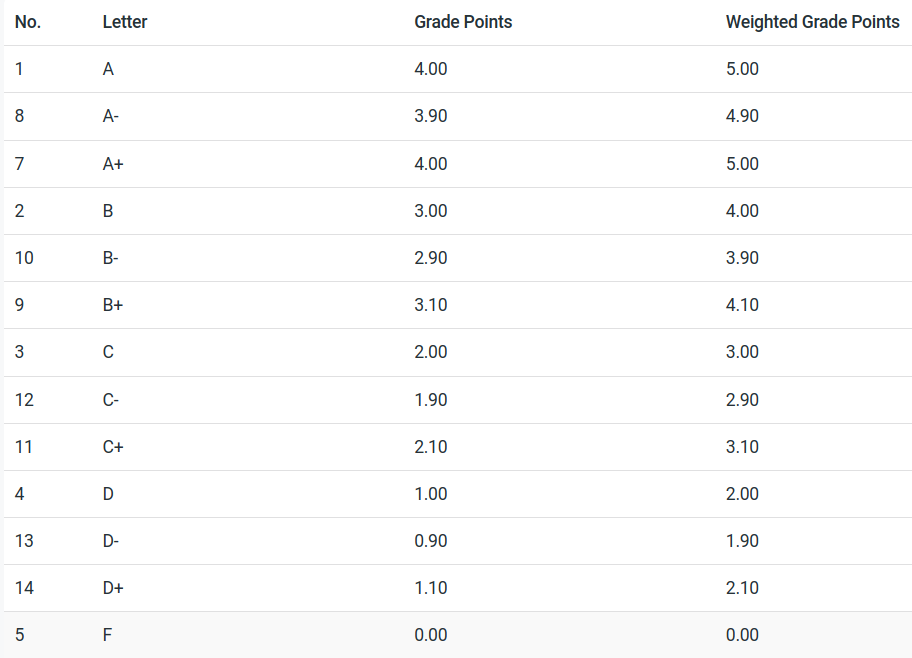](https://cs.studianova.org/admin/marksystem)
| [GPA Calculations](https://bsa.lynops.com/books/personal-education-management-system/page/6-transcript-gpa-calculation-tbd) | Not started | #### 6.2 Calculate Student Term GPAs
|
|
| *Purpose* | *The GPAs are calculated based on the points awarded for each enrollment and the units earned for each enrollment record.* |
|
| *Trigger* | *When ever there is a change to the any of the points fields.* |
|
| *Conditions* | *Points fields are not empty.* |
|
| *Sequence* | *This function runs after the points have been updated.* |
|
| Step 1 | Calculate [Student Term](https://cs.studianova.org/admin/studentterms) Units Earned. Sum all associated [enrollment](https://cs.studianova.org/admin/enrollments) units earned.
|
|
| Step 2 | Calculate standard adjusted [Student Term](https://cs.studianova.org/admin/studentterms) Units Earned.
Sum all units earned from all [enrollment](https://cs.studianova.org/admin/enrollments) records where | [Class ](https://cs.studianova.org/admin/classlist)| Exclude GPA = standard
Subtract excluded units (above) from [Student Term](https://cs.studianova.org/admin/studentterms) Units Earned
|
|
| Step 3 | Calculate alternate adjusted [Student Term](https://cs.studianova.org/admin/studentterms) Units Earned.
Sum all units earned from all [enrollment](https://cs.studianova.org/admin/enrollments) records where | [Class ](https://cs.studianova.org/admin/classlist)| Exclude GPA = alternate
Subtract excluded units (above) from [Student Term](https://cs.studianova.org/admin/studentterms) Units Earned
|
|
| Step 4 | Calculate [Student Term](https://cs.studianova.org/admin/studentterms) GPA:
Calculate total points:
For each [enrollment](https://cs.studianova.org/admin/enrollments) record
sum (units earned x grade points)
GPA = total points / standard adjusted units earned (step 2)
|
|
| Step 5 | Calculate [Student Term](https://cs.studianova.org/admin/studentterms) Weighted GPA:
Calculate total points:
For each [enrollment](https://cs.studianova.org/admin/enrollments) record
sum (units earned x weighted points)
GPA = total points / standard adjusted units earned (step 2)
|
|
| Step 6 | Calculate [Student Term](https://cs.studianova.org/admin/studentterms) Alternate GPA:
Calculate total points:
For each [enrollment](https://cs.studianova.org/admin/enrollments) record,
sum (units earned x alternate grade points)
GPA = total points / alternate adjusted units earned (step 3)
|
|
| Step 7 | Calculate [Student Term](https://cs.studianova.org/admin/studentterms) Alternate Weighted GPA:
Calculate total points:
For each [enrollment](https://cs.studianova.org/admin/enrollments) record,
sum (units earned x alternate weighted grade points)
GPA = total points / alternate adjusted units earned (step 3)
|
| END |
| |
#### 6.2 Test Case
|
| Units Earned | Standard adjusted Units earned | Alternate Adjusted Units Earned | Grade Points | Weighted Grade Points | Alternate Grade Points | Alternate Weighted Grade Points |
| enrollment 1 | 5 | 5 | 5 | 4.0 | 5.0 | 4.0 | 5.0 |
| enrollment 2 - excluded standard | 5 | 0 | 5 | 0 | 0 | 2.0 | 3.0 |
| enrollment 3 | 5 | 5 | 5 | 3.0 | 3.0 | 3.0 | 3.0 |
| enrollment 4 - excluded alternate | 5 | 5 | 0 | 2.0 | 2.0 | 0 | 0 |
| Student Term Values | 20 | 15 | 15 | (4.0x5) + (0x5) +(3.0x5) +(2.0x5) = 45
**45/15 = 3.0**
| (5.0x5) + (0x5) +(3.0x5) +(2.0x5) = 50
**50/15 = 3.33**
| (4.0x5) + (2.0x5) +(3.0x5) +(0x5) = 45
**45/15 = 3.0**
| (5.0x5) + (3.0x5) +(3.0x5) +(0x5) = 55
**55/15 = 3.67**
|
| Student Term Fields | units earned | - | - | GPA | WGPA | AGPA | AWGPA |
# 7. Activate Next Student Plan - TBD
The **student plan table** shows the status of the various plans the student has been assigned over time, it is like a log file for the student plans.
- Multiple student plan records may be associated to a student record
- Only one plan may be active at any point in time. **Program\_status =** active.
- There may be other student plan records associated with the student, but their status may not be active.
- The **program start term** field contains information on the school term, not the student term. This is an important value and so the name is stored in the student plan term reocrd field called program start term.
#####
### Only one student plan record may be active at a time
Develop a combination of UI and programming to ensure that only one student plan is active at ay point in time - (I have no idea how to do this)
#####
### Find Program start term from start date
When the user assigns the student a plan, they may enter the start date of the plan. For new students is will be important to enter the start date of the plan, as they may be starting in middle of a term. It is important to know if they had less time to complete courses due to a mid-term start date.
Based on the start\_date of the student plan, PEMS identifies the starting school term and creates the relationship between school term and the student's plans.
#####
### Entering State date from Program Start Term
Once a new student has become recurring student, it is easier to enter the **program start term**, rather than the start date. The start date of the student plan should be the corresponding start date ot the **Program start term.**
*However, if the user selects a **Program start term** after a student plan start date has been entered, this function will over-write the start date. We do not want to overwrite a start date as that may contain userful information.*
If the **Program start term** is input by the user, then enter the start date from the **Program start term's** start date, but only if the start date field is empty.
### Determining the school term when a student plan is complete
Student Plans are used to create enrollments, but eventually each student will complete their plan and need to be assigned another plan. In the course of 13 years of school, the student will likely complete 6 to 8 plans.
- The student plan is associated to only one school plan in the prgrams of study table. The school plan includes the *total number of terms* required to complete the plan.
- The student's plan record contains the **program start term**.
- To find the last term of the student plan, add the total number of terms to the sequence
student plan record: *program start term:* related sequence + related school plan: *total number of terms* = sequence of term the school plan will be completed
### Completing the Active Student Plan
We can find the school term when a student plan should completed (see above). When the last school term in the plan has passed, PEMS can mark the student plan record complete. The student plan record is marked complete based only on the calendar. A student's marks for classes during the plan are not relevent.
So when the current date is passed any student's plan's final term current date, then the student plan record will be marked complete.
When the current date is >/= end date of the student plans' final term, then change the status of the student plan to 'completed.
### Activating the next student plan
If there is another student plan record with status = future, then we can automatically activate the next plan record, after we set the satus of the student plan record above to completed. Each student plan is associated to a **program start term**, which has a sequence. The next student plan will have a **program start term** sequence greater than the last student plan record **program start term's** sequence. *The last student plan record will be the record we most recently marked complete in the step above.*
However, there could be multiple student plans with **program start term** sequence greater than the current school term. So we need to find the *lowest* sequence number that is also greater than the last **program start term's** sequence.
FInd the student plan record where the **program start term's** squence is greater than the last student plan's **program start term's** sequence, but also the lowest value in all the avaiable student plan records. Set this student plan status to active.
### No future plan exists
If there are no student plan records with status = future, then the student can not automically be assigned the next plan. For students who have had their plan marked completed, but they have no future plan, we will create a filtered report for the user. The user will then assign a plan for these students. Ideally, the user will complete this task before the end of term.
Create a filtered list of students who do not have any active student plans for the user to review and address
All new student plan records will default to status = future.
### When a Student Plan is activated
When a new student plan is activated, status was changed from future to active. This change in status will trigger the next process, creating the set of enrollment records.
### When a Student plan is Changed before its completion
A student may need to change the plan they are working towards. This may occur after some enrollment records were already created, and some records may be completed while others are not completed.
For a change of plan, the active plan program value field is set to 'suspended' by the user. A new plan will be created as a future plan, then the field status changed from future to active. This set of actions will trigger the creating of new enrollment records.
# 8. Groups Function
| [Groups](https://bsa.lynops.com/books/personal-education-management-system/page/groups-table "Groups") | Not started | #### 1.0 Create Group records for new Homeroom record
|
|
| *Purpose* | *When a new homeroom is added, the group records in PEMS are created.* |
|
| *Trigger* | *Runs only one time, when the new homeroom record is added.* |
|
| *Conditions* | *homeroom status field is active.* |
|
| *Sequence* | *This function runs after a new homeroom record is created* |
| | Step 1 | Find Set of all Active Curriculum records.
|
|
| Step 2 | Create a Group record for each Curriculum record.
|
|
| Step 3 | Set Homeroom = to the new homeroom record created.
|
| END |
| |
| [Groups](https://bsa.lynops.com/books/personal-education-management-system/page/groups-table "Groups") | Not started | #### 2.0 Create Group records when a curriculum record has been activated
*note: do not allow new curriculum records to be created with status = active, default must be draft.*
|
|
| *Purpose* | *When a new curriculum record has been added, group records need to be made for all active homerooms.* |
|
| *Trigger* | *Runs whenever the status field in the curriculum record has been changed to 'active'* |
|
| *Conditions* | *curriculum status field has been changed from any value to active.* |
|
| *Sequence* | *This function runs after the curriculum status has been changed.* |
| | Step 1 | Find Set of all Active Homeroom records
|
|
| Step 2 | Create a Group record for each homeroom record
|
|
| Step 3 | Set Curriculum in the group record = to the newly activated curriculum record.
|
| END |
| |
| [Groups](https://bsa.lynops.com/books/personal-education-management-system/page/groups-table "Groups") | Not started | #### 3.0 Deactivate Group when home room is deactivated or Curriculum is deactivated
*note: add active/inactive status field to Group and Homeroom*
|
|
| *Purpose* | *\#When a curriculum is not longer uses or a homeroom no longer operates, deactivate the associated group.* |
|
| *Trigger* | *Runs whenever the the status field in the curriculum or homeroom record has been changed to 'inactive'* |
|
| *Conditions* | *Curriculum status field has been changed from any value to inactive.*
*OR*
*Homeroom status field has been changed to inactive*
|
|
| *Sequence* | *This function runs after the curriculum or homeroom status has been changed.* |
| | Step 1 | Find related Group record
|
|
| Step 2 | Set Group record status to inactive.
|
| END |
| |
# 0.Add New Fields - Completed
##### System Level Fields - Configuration Page
*This table page should replace the "parameters" page and table with system level field values below:*
| **Field Name** | **Description** | **Reference** |
| Terms Per Year | This is already column in the parameters table, convert to a field on the configuration page | [https://cs.studianova.org/admin/parameters](https://bsa.lynops.com/parameters) |
| Days Per Year | This is already column in the parameters table, convert to a field on the configuration page | [https://cs.studianova.org/admin/parameters](https://bsa.lynops.com/parameters) |
| School Beginning Date | This is already column in the parameters table, convert to a field on the configuration page | [https://cs.studianova.org/admin/parameters](https://bsa.lynops.com/parameters) |
| Back Years | This is already column in the parameters table, convert to a field on the configuration page | [https://cs.studianova.org/admin/parameters](https://bsa.lynops.com/parameters) |
| Attrition Rate | This is already column in the parameters table, convert to a field on the configuration page | [https://cs.studianova.org/admin/parameters](https://bsa.lynops.com/parameters) |
| Student Teacher Ratio | This is already column in the parameters table, convert to a field on the configuration page | [https://cs.studianova.org/admin/parameters](https://bsa.lynops.com/parameters) |
| Promotion Date | Date field when the students are promoted by grade level | [1.Calendar Functions](https://bsa.lynops.com/books/personal-education-management-system/page/1-calendar-functions-ready) |
| Lowest Grade Level | Menu select from K-12 list |
|
| Highest Grade Level | Menu select from K-12 list |
|
|
|
|
|
##### Table Field Updates
| **Field Name** | **Description** | **Reference** |
| Term Starts | **Term Label Table** - menu select
menu options: "i*n academic start year*" and "in academic end year"
| [Default Term Years](https://bsa.lynops.com/books/personal-education-management-system/page/4-create-set-of-school-terms-ready)
|
| Term Ends | **Term Label Table -** menu select
menu options: "in academic start year" and "*in academic end year*"
| [Default Term Years](https://bsa.lynops.com/books/personal-education-management-system/page/4-create-set-of-school-terms-ready) |
| Assessment Window | Term Label table - integer value | [Assessment Module](https://bsa.lynops.com/books/personal-education-management-system/page/assessment-module) |
| Type - change menu options | Assessment Code table - change menu options to "Level Equivalent", "Percentile Rank", "Competency" | [Assessment Module](https://bsa.lynops.com/books/personal-education-management-system/page/assessment-module) |
| Subject field - make mandatory | Assessment Code table | [Assessment Module](https://bsa.lynops.com/books/personal-education-management-system/page/assessment-module) |
| Percentile Rank | Marks Matrix table - add a decimal field, two places | [Assessment Module](https://bsa.lynops.com/books/personal-education-management-system/page/assessment-module) |
| Relationship - relate assessment results table to student term table | multiple assessment results per student term | [Assessment Module](https://bsa.lynops.com/books/personal-education-management-system/page/assessment-module) |
| Percentile Rank | Assessment Result table - integer value | [Assessment Module](https://bsa.lynops.com/books/personal-education-management-system/page/assessment-module) |
| Moodle Learning Plan | program of study table - text field | [Assessment Module](https://bsa.lynops.com/books/personal-education-management-system/page/assessment-module) |
| Learning Plan Status | program of study table - text field | [Assessment Module](https://bsa.lynops.com/books/personal-education-management-system/page/assessment-module) |
| Plan GPA | Student Plan Table - decimal value, two places | [Student Plan Table](https://bsa.lynops.com/books/personal-education-management-system/page/student-plan-table) |
| Expiry Date | authorizations table - date field | [Authorizations](https://bsa.lynops.com/books/personal-education-management-system/page/authorizations) |
|
|
|
|
|
|
|
|
##### Relationship and Table Changes
| **Tables** | **Description** | **Reference** |
| Relationship - relate assessment results table to student term table | multiple assessment results per student term | [Assessment Module](https://bsa.lynops.com/books/personal-education-management-system/page/assessment-module) |
| Delete CredAuthorizations table | replace with multi-select field in authorizations table (see below) | [Authorizations](https://bsa.lynops.com/books/personal-education-management-system/page/authorizations) |
| For Authorizations, add a multi-select pick list that allows users to select from the credential table. | Authorizations | [Authorizations](https://bsa.lynops.com/books/personal-education-management-system/page/authorizations) |
| templates are child records to subject requirements | many template to one subject requirement record | [3.Programs of Study and Subject Requirements](https://bsa.lynops.com/books/personal-education-management-system/page/4-programs-of-study-and-subject-requirements) |
|
|
|
|
|
|
|
|