Homeroom
Home rooms are groups of students and teachers that form a private group in the same Moodle Instance.
- Homeroom Module Overview
- Homeroom and Proctor Tables
- Groups Table
- Applicants Table
- Suite CRM Integration
Homeroom Module Overview
Relevant Topics
The Studia Nova Business Model is unique in the industry in that it encourages third parties to set up physical classroom locations for students to gather while Studia Nova, the private school of record, provides the virtual curriculum and record keeping. At these different locations, students can be any grade level and a single teacher can be trained to manage a mixed group of various grade levels. However, each location can be a separate client, and so it is essential that each location only see the student information pertaining to its own students.
Virtual learning allows families and communities to re-group themselves in unique ways to help students achieve their online learning goals. Read more about One Room School Houses. PEMS is configured to allow third parties to participate in the learning process. A homeroom can be a tutoring club with computers where students come to learn, or a homeroom may be a family with multiple students learning from home.
Terminology
In real life, a cohort is a set of students at a specific grade level. All ninth graders in 2023 form a set of students, as they move through the various grade levels, we refer to those 2024 ninth graders as a cohort. In Moodle a cohort is a set of students and a teacher(s). Cohorts are primarily used in Moodle for batch enrollment. For the use case that all students in 4th grade should be enrolled in 4th grade math. In this case a Moodle user would define a cohort of 4th graders, then assign the cohort to a specific course. However, using cohorts for enrollment is not useful in PEMS because each student is following a unique program. The unique program is managed in the SIS. In PEMS, all fourth graders are not enrolled in fourth grade math. However, cohorts are still useful for reporting. So in PEMS, Moodle Cohorts are used to identify a set of students under the supervision of a particular teacher (proctor). In this use case, students can be at any grade level since PEMS is designed for mixed grade-level student management. Unfortunately, Moodle Cohorts can not be used to block a teacher from seeing other student's work who are not in their own cohort. In summary 1) Moodle Cohorts are a set of students and their teachers (proctors) 2) the students in the set can be any grade level 3) Cohorts are useful for reporting 4) All teachers can see all students in any cohort.
In real life, Sections are a set of students taking a particular class. In a standard brick and mortar school, a sections are like the physical classroom. There may be multiple teachers teaching English 9 in a school, each with their own physical classroom number. There are no traditional sections in the PEMS universe since there is no needs to physically separate students into various classrooms. However, students from multiple learning locations can all be enrolled in the same Moodle Course, and only their own teacher should see their work. So PEMS uses the term groups to refer to a set of students assigned to a specific teacher. In Summary: 1) PEMS does not use the term sections. 2) Instead Moodle uses the term (virtual) groups.
In Moodle, Groups are used to break up groups of students enrolled in a course. Moodle can enroll hundreds of students in one course, but the teacher would be overwhelmed to grade all the work. Therefore Moodle provides the group option. When teachers and their students are enrolled in the same group, the teacher only sees their own students. In PEMS, Moodle groups are used to block teachers from seeing students that belong to a different location. However, Moodel groups are not defined at the system level in Moodle, they must be defined in each and every course. In Summary: 1) Moodle uses Groups to hide students enrolled in the same course from other teachers. 2) Both the teacher and the student have to be in the same group. 3) Groups MUST be defined for each and every course, Groups can not be defined at the system level.
Enrollment is the process of signing up for a class. An enrollment record in the PEMS is the class as student takes in a specific term, and stores the student's final grade. The set of completed enrollments is the information displayed on the student's transcript.
Why is the text for Relevant Topics and Terminology showing up in that code when it is in editing mode? Not that it's ultimately a big deal.
From the definition, cohorts and groups can be easily confused. They seem to have the same definition.
Problem of teachers being able to see the record of students who aren't in their cohort can be changed manually right? If so, that should be mentioned.
The Homeroom
Homerooms are a group of students under the supervision of a proctor. Homerooms are also Studia Nova's B2B clients. The Freedom Library Club (FLC) is the first homeroom client. Nova Schools is a second client.
An organization, club, or business may have multiple locations, but the client is provided a single recruitment website. Each physical location must identify at least one proctor to supervise the on-site students. Homerooms are the individual locations. the group of students under an identified proctor.
On the partner's enrollment site, prospective students complete an enrollment form. In that enrollment form, the submitter selects a location. This location in the enrollment is considered a homeroom in PEMS. When a club or organization adds new location, a new homeroom record must be added to the PEMS homeroom table.
In summary, homerooms are locations where students gather under the supervision of a proctor. The proctor grades the assignments submitted only by their students.
I'm tracking that proctors can only be assigned to one homeroom, and can review the work of students in their group. Teachers still have more administrative power, and proctors in the definition sound like a version of a TA; helping take load off of teacher.
Proctors
Where teachers are the qualified and certificated individuals that overlook many virtual students, PEMS allows proctors to supervise students and review their work in Moodle, helping to keep students on track. Proctors are not allowed any access to the SIS, but they are provided limited access to Moodle, and in this way, only see the work of their own group of students. Proctors may be volunteers working in a tutoring club setting, or may simple be a home school parent managing their own student's progress. A homeroom can have multiple proctors, but a proctors may only be assigned to one homeroom.
In summary, a proctor should only grade the assignments of their own students. A proctor does not required teacher certifications.
Groups
The Moodle Groups function is the only option to provide the capability to block teachers from seeing students that do not belong to them. Therefore, when the SIS enrolls a student in the Moodle Course, the SIS must have all the information required to create the Moodle Group at the course level, then add that student to the group.
To accomplish this requirement, the SIS has a groups table that mirrors the Moodle Groups. A Moodle course has multiple groups (one group for each homeroom). When a student is enrolled in the course, the student is assign to the group that corresponds to the student's homeroom.
Data Relationships

Note: above diagram shows one to many for proctors to Home rooms - this should be many to many.
The organization is provided a Word Press recruitment website, which allows students to enroll on their branded website. The website may have multiple locations. Each location from all the recruitment websites correspond to one homeroom record.
For every homeroom record there is a corresponding Moodle cohort. A Moodle cohorts do not limit proctors from seeing other student, but Moodle does provide cohort-level reporting, and so reporting for proctors is easier with cohorts.
^Confusing sentence about Moodle cohorts not limiting proctors from seeing other students. Other students from different groups, cohorts?
Each homeroom must have at least one Proctor. A homeroom is allowed multiple proctors, but a proctor may only be assigned to one homeroom.
Students are assigned to only one homeroom, there can be multiple students in a homeroom.
Only the Moodle Groups feature is able to limit which students a proctor can review. Groups must be defined in each and every course. The SIS Group table directly corresponds to Moodle Groups.
For example, a homeroom name might be FLC-Placerville, for a location run by the FLC organization. If there are 40 curriculum records, there will be 40 SIS Group records with the name of FLC-Placerville, but each SIS group record is linked to a unique curriculum record. While the groups and cohorts have the exact same name, they are very different types of records.
Reading up to this point, group vs cohort is still a little confusing for reader.
The SIS creates an enrollment record for each Moodle Course a student takes. With the implementation of the Homeroom Module, each enrollment record has a SIS group record identified. When that student is enrolled in the Moodle course, the enrollment record communicates to Moodle which group to put the student in.
Homeroom Module Workflow
When a new client is on-boarded, homeroom records are created for their launch locations. When they add a location, the client submits a form to the SIS, once approved, a new homeroom record is created.
As the client operates, the client adds and deletes proctors. The client submits a form to add a proctor and when approved, the SIS adds the proctor to the proctor table.
When new students are enrolled into the school, their student record is linked to the homeroom record that is specified in their enrollment form.
When students are assigned their classes, PEMS creates enrollment records in the SIS, one enrollment record for each class they take. The enrollment record specify the curriculum (Moodle Course) and is associated to the student term, which is linked to only one student.
When it is time to enroll students in their Moodle courses, the administrator triggers their enrollment based on their enrollment records. The enrollment record includes the name of the SIS Group, and so the student is assigned to the correct group in Moodle in the correct course.
So students in the same virtual school who are taking different classes can have the same teacher? The students in the same school, but taking different curriculums to fulfill the same requirement would be in different groups but the same cohort?
Action Items JAN 2024
1-MVP | HOMEROOM | Move the 'define groups' table from the school module to the Homeroom module
Homeroom and Proctor Tables
Homeroom Fields
Homeroom Name - the name of the location.
Website code - name that matches how the location is displayed in the partner website.
Homeroom code - an abbreviation for the site that is used to match to Moodle Cohort ID.
CRM Client ID - client ID uniquely identifies the organization that operates the homerooms in the CRM.
Enrollment website - the link to the provided enrollment site.
Proctor Fields
CRM Contact ID - the unique ID record in the CRM for the Proctor.
Contact detail: first. middle, last name, email address, physical address, cell phone number from CRM
Select homeroom - only one may be selected.
CRM Workflow
When a new contract is signed in CRM, an associated homeroom record is created for the client. The client ID is tracked in the homeroom record. As a clients adds or deletes locations contracts are updated and homeroom records are correspondingly updated.
In CRM, proctors are the client's employees, or contacts that are associated to the organizations. The client completes a form on their enrollment website to add a proctor. Once submitted the form creates/updates the CRM. The new contact record in CRM triggers the creation of a proctor record in SIS.
Action Items JAN 2024
1-MVP | HOMEROOM | Proctor and Homeroom tables do not exist yet, make tables in the homeroom module.
Groups Table
Groups Overview
PEMS must provde a means to limit a proctor's access to view other student work in Moodle. In Moodle, this feature in only available using Moodle Groups. Moodle Groups allow teachers (proctors) to see only their assigned students. A Moodle Group needs to be created for each course. Then the students and the teacher are assigned to that group during the enrollment process. If properly implement, a proctor will only see work from students in the same group as them in that particular course.
Using the Moodle interface, this is a tedious and error-prone process so this function will be driven by the SIS enrollment workflow.
In a virtual school, an unlimited number of students may take any online course at anytime. However, the teacher of record is still responsible for grade student work and assign final grades. Too many students in a course can overwhelm any online teacher, especially as some organizations have a requirement for the student to have virtual, synchronous lessons or for the teacher to hold office hours. Group management is used to track and limit the number of students a teacher-of-record must look after.
Data Relationships

Each curriculum record will be associated to multiple groups, as many groups as locations in operation. A location will have multiple student grade levels, any combination of K through 12 students, so the groups are not restricted to any specific grade level.
The groups are related to the homeroom. A group can have only one homeroom.
Each student enrollment records is related to one SIS Group record. Note there is no direct relationship between students, proctors, and Teachers, the relationship is created only through the SIS group record.
As a location (Homeroom) is allowed multiple proctors, multiple proctors need to be associated to the group. There is a many to many relationship between proctors and SIS groups, because multiple proctors review multiple courses.
The proctor does not fulfill the regulatory requirements of the teacher of record. There can be only one teacher of record for any class a student takes, so there is only one teacher of record for a group. The teacher of record may be related to multiple groups (for other classes the teacher teaches). The teacher of record is not related to the curriculum record, the teacher is only related to the SIS group record. In relating the teacher to the group record, SIS can better manage the reporting on which specific students took the course under what teacher.
The number of SIS Group records equals the number of (active) Curriculum records times the number of homerooms (locations.)
Fields
Group Name - Concatenate the Homeroom and Moodle Course ID.
Capacity - the maximum number of students allowed in the group, default to 40.
Action Items JAN 2024
1-MVP | HOMEROOM | Add Many to Many relationship to Proctor to current groups table.
1-MVP | HOMEROOM | Add Select one teacher of record in the group record
1-MVP | HOMEROOM | Add Select one Homeroom in the group- record
1-MVP | HOMEROOM | Add the ability to select one group in the enrollments record.
1-MVP | HOMEROOM | Add the field to indicate the Teacher of Record Authorization Status - options are "clear, unauthorized, expiration risk, temporary authorization" (same as the current sections table which will be deprecated)
1-MVP | HOMEROOM | Deprecate the Sections table in the teacher module, its function is replaced by this group table.
Applicants Table
tbd
1-MVP | HOMEROOM | Add the enrollment data from the word press site to a 'Applicants table' in the homeroom module.
Suite CRM Integration
Suite CRM is used primary to transmit the necessary documentation required to process a student's enrollment. The application is also used to track new 'homeroom' customers, or new businesses that want to open classrooms. Because we want to market the PEMS as a stand alone product, see the Product Marketing Strategy. This integration must be structured as optional.
The approach is used to map the data architecture between PEMS and Suite CRM.

Homeroom (classroom location)
PEMS can enter the homeroom directly when the Suite CRM is not used, but if Suite CRM is implemented, then the homeroom comes from Suite into PEMS.
The master list of homerooms is managed in PEMS. However, the homeroom record first enters the software universe through Suite CRM because a homeroom is a potential client of the School.
The homeroom is an opportunity record with type = homeroom. The opportunity record represents a classroom location linked to an account record with type = facility. A facility can run multiple homerooms, or multiple opportunity records.


The homeroom record is created in PEMS when an opportunity record with type = "homeroom" is closed.
Proctor
There is little need to have the proctors in the Suite CRM. Proctors are employees of the facilities. However a proctor can be an a one-person operation that is both the client and the employee, operating as a small business.
Proctors need to be in PEMS because they must be added to the Moodle Groups in order to view only their assigned students. Like homerooms, proctors begin as records in Suite CRM, if a CRM is being used.
However, a proctor is an account record with contact PEMS type = Proctor.
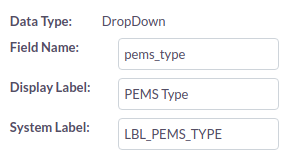

A proctor is a contact record that should be linked to the homeroom opportunity record and the facility account record. When the opportunity is closed, the proctor record should be made in PEMS.
When a new proctor is added to the closed opportunity record for the homeroom, the proctor is added to PEMS.
If the proctor contact record which is linked to the closed opportunity record for the homeroom is deleted, de-linked, in Suite CRM, the status of the proctor is updated in PEMS. (status fields are TBD).
Student (Enrollment)
PEMS sends the information from an enrolled student to Suite CRM. Student leads go into PEMS from the website, but untill the student is accepted, there is to transmission of information to Suite CRM.
Opportunities records in Suite CRM represent student enrollments in PEMS. They are created only after the enrollment form submitted on the website.
Student Name > Opportunity Name
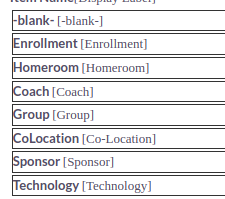
The opportunity type for a student enrollment being entered from PEMS is "Enrollment." The opportunity TYPE field and options are shown below:

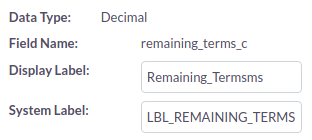
The remaining terms is imported in to Suite CRM so that the total revenue from the enrollment may be calculated. The customer field "Remaining Terms" has been created in Suite CRM.
Parents are contacts in SuiteCRM, so when a new student is entered from PEMS into Suite, the primary parent in only created if a contact record is not found.
Other Schools (Previous School)
In order to create an esign pdf from SuiteCRM, the previous school must also be an account record in Suite CRM. A contract record is created that is linked to the previous school account, the parent contact, and the student opportunity. From this contract, the data in the records request can be entered into the merge pdf.
The list of Previous Schools (Other Schools) in PEMS must be synchronized with the set of Account records that are type of registrars.
PEMS is to be sold as an add-on module to Moodle, and it should not require a CRM to function. Therefore, the list of previous schools must be self-contained in PEMS. When the student is accepted in PEMS, the user must select the correct name from the other schools table based on the text field completed in the enrollment form. The other school record must be entered in the enrollment process in PEMS before the student may be accepted.
When the SuiteCRM integration point is implemented, when every and opportunity record is created for a new student record, then the new other school must also be created as an account record with type = "Registrar". If the record exists already in Suite CRM, then no new other school record will be created.
The following fields are in the PEMS for other schools and should be mapped into the respective SuiteCRM fields.
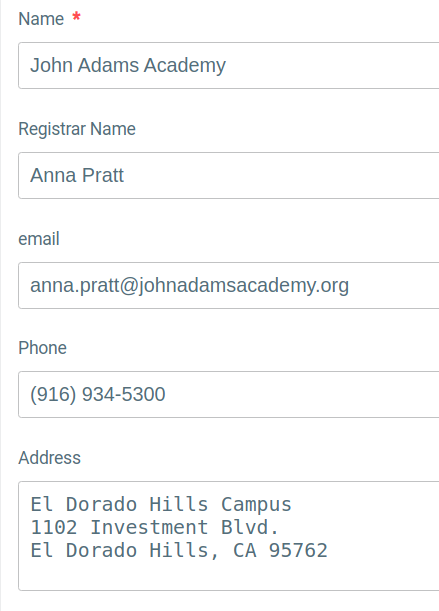
The Name is mapped to the Suite CRM Account Name.
The Registrar name is mapped to the Suite CRM custom text field "Registrar Name"
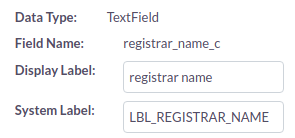
The address is mapped to SuiteCRM Shipping address.
The email is added as the primary email (email1).