# Homeroom Module Overview
### Relevant Topics
{{@126#bkmrk-the-studia-nova-busi}}
{{@126#bkmrk-virtual-learning-all}}
### Terminology
{{@185#bkmrk-a-cohort-is-a-group-}}
{{@90#bkmrk-sections-are-a-set-o}}
{{@185#bkmrk-sections-are-used-to}}
{{@90#bkmrk-in-summary%2C-enrollme}}
Why is the text for Relevant Topics and Terminology showing up in that code when it is in editing mode? Not that it's ultimately a big deal.
From the definition, cohorts and groups can be easily confused. They seem to have the same definition.
Problem of teachers being able to see the record of students who aren't in their cohort can be changed manually right? If so, that should be mentioned.
### The Homeroom
**Homerooms** are a group of students under the supervision of a proctor. Homerooms are also Studia Nova's B2B clients. The [Freedom Library Club](https://www.freedomlibrary.club/) (FLC) is the first homeroom client. [Nova Schools](https://novaschools.org/) is a second client.
An organization, club, or business may have multiple locations, but the client is provided a single recruitment website. Each physical location must identify at least one proctor to supervise the on-site students. Homerooms are the individual locations. the group of students under an identified proctor.
On the partner's enrollment site, prospective students complete an enrollment form. In that enrollment form, the submitter selects a location. This location in the enrollment is considered a **homeroom** in PEMS. When a club or organization adds new location, a new homeroom record must be added to the PEMS homeroom table.
*In summary, homerooms are locations where students gather under the supervision of a proctor. The proctor grades the assignments submitted only by their students.*
I'm tracking that proctors can only be assigned to one homeroom, and can review the work of students in their group. Teachers still have more administrative power, and proctors in the definition sound like a version of a TA; helping take load off of teacher.
### Proctors
Where teachers are the qualified and certificated individuals that overlook many virtual students, PEMS allows **proctors** to supervise students and review their work in Moodle, helping to keep students on track. Proctors are not allowed any access to the SIS, but they are provided limited access to Moodle, and in this way, only see the work of their own group of students. Proctors may be volunteers working in a tutoring club setting, or may simple be a home school parent managing their own student's progress. A homeroom can have multiple proctors, but a proctors may only be assigned to one homeroom.
*In summary, a proctor should only grade the assignments of their own students. A proctor does not required teacher certifications.*
### Groups
The Moodle Groups function is the only option to provide the capability to block teachers from seeing students that do not belong to them. Therefore, when the SIS enrolls a student in the Moodle Course, the SIS must have all the information required to create the Moodle Group at the course level, then add that student to the group.
To accomplish this requirement, the SIS has a groups table that mirrors the Moodle Groups. A Moodle course has multiple groups (one group for each homeroom). When a student is enrolled in the course, the student is assign to the group that corresponds to the student's homeroom.
### Data Relationships
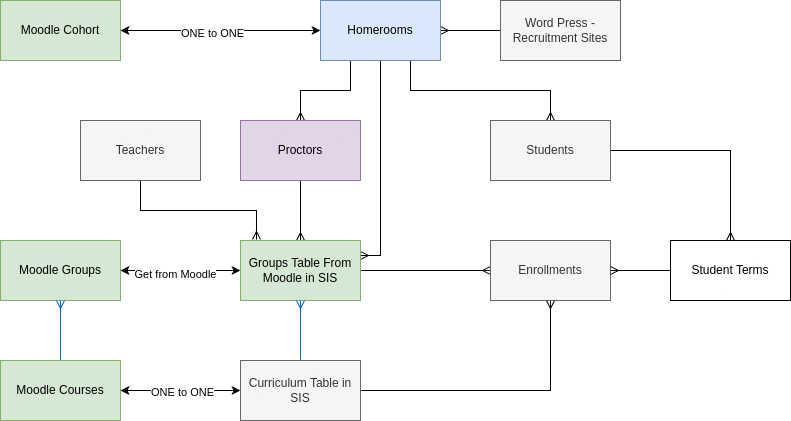
*Note: above diagram shows one to many for proctors to Home rooms - this should be many to many.*
The organization is provided a Word Press recruitment website, which allows students to enroll on their branded website. The website may have multiple locations. Each location from all the recruitment websites correspond to one homeroom record.
For every homeroom record there is a corresponding Moodle cohort. A Moodle cohorts do not limit proctors from seeing other student, but Moodle does provide cohort-level reporting, and so reporting for proctors is easier with cohorts.
^Confusing sentence about Moodle cohorts not limiting proctors from seeing other students. Other students from different groups, cohorts?
Each homeroom must have at least one Proctor. A homeroom is allowed multiple proctors, but a proctor may only be assigned to one homeroom.
Students are assigned to only one homeroom, there can be multiple students in a homeroom.
Only the Moodle Groups feature is able to limit which students a proctor can review. Groups must be defined in each and every course. The SIS Group table directly corresponds to Moodle Groups.
For example, a homeroom name might be FLC-Placerville, for a location run by the FLC organization. If there are 40 curriculum records, there will be 40 SIS Group records with the name of FLC-Placerville, but each SIS group record is linked to a unique curriculum record. While the groups and cohorts have the exact same name, they are very different types of records.
Reading up to this point, group vs cohort is still a little confusing for reader.
The SIS creates an enrollment record for each Moodle Course a student takes. With the implementation of the Homeroom Module, each enrollment record has a SIS group record identified. When that student is enrolled in the Moodle course, the enrollment record communicates to Moodle which group to put the student in.
### Homeroom Module Workflow
When a new client is on-boarded, homeroom records are created for their launch locations. When they add a location, the client submits a form to the SIS, once approved, a new homeroom record is created.
As the client operates, the client adds and deletes proctors. The client submits a form to add a proctor and when approved, the SIS adds the proctor to the proctor table.
When new students are enrolled into the school, their student record is linked to the homeroom record that is specified in their enrollment form.
When students are assigned their classes, PEMS creates enrollment records in the SIS, one enrollment record for each class they take. The enrollment record specify the curriculum (Moodle Course) and is associated to the student term, which is linked to only one student.
When it is time to enroll students in their Moodle courses, the administrator triggers their enrollment based on their enrollment records. The enrollment record includes the name of the SIS Group, and so the student is assigned to the correct group in Moodle in the correct course.
So students in the same virtual school who are taking different classes can have the same teacher? The students in the same school, but taking different curriculums to fulfill the same requirement would be in different groups but the same cohort?
### Action Items JAN 2024
1-MVP | HOMEROOM | Move the 'define groups' table from the school module to the Homeroom module