
6. Transcript GPA Calculation - Updated
| GPA Calculations | Not started |
6.1 Calculate Grade Point Fields in Enrollment record |
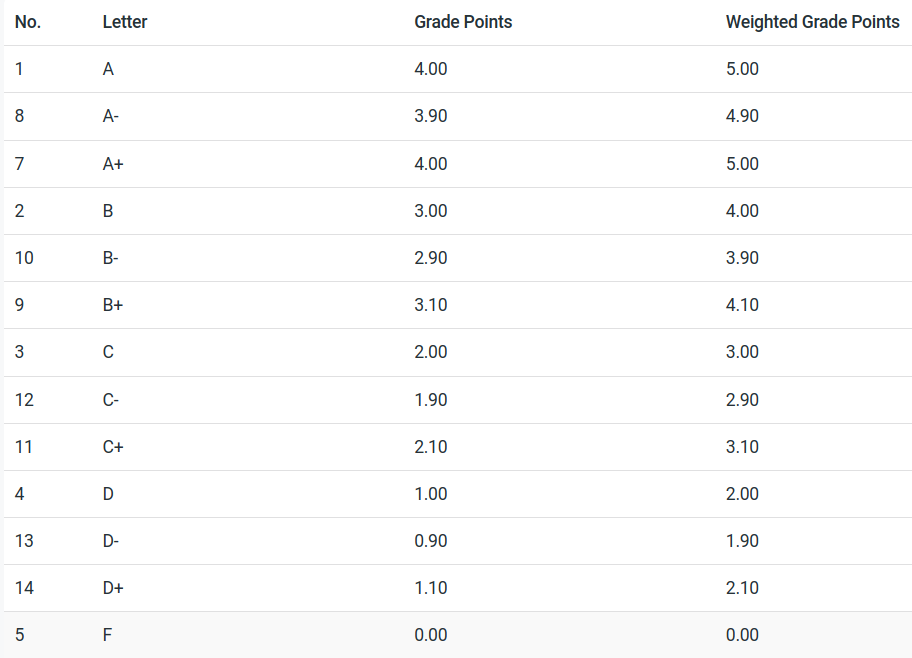
| Purpose | Based on the letter grade, look up the grade points from the Marking System table. The Marking System table allows schools to customize the points they give based on a letter grade. | |
| Trigger | Update whenever enrollment status = completed, and then whenever there is a change to the enrollment letter grade. | |
| Conditions | Marking System table has been configured. | |
| Sequence | This function can only run after students have been enrolled in courses. | |
| all fields are first set to unweighted values | Step 1 |
Based on enrollment letter grade, look up grade points in Marking System table Set enrollment grade points to Marking System grade points. Set enrollment weighted grade points to Marking System grade points. Set enrollment alternate grade points to Marking System alternate grade points. Set enrollment alternate weighted grade points to Marking System alternate grade points. |
| weighted fields are increased only when appropriate | Step 2 |
Look up enrollment | curriculum | Compliance Tags. If associated curriculum has ANY compliance tag with "Weight GPA" = yes Then: Set enrollment weighted points to Marking System weighted points. Set enrollment alternate weighted points to Marking System alternate weighted points. |
| fields are zeroed if excluded from gpa calculations | Step 3 |
Look up enrollment | Class | Exclude GPA If Exclude GPA = standard GPA then Set enrollment Grade Points to zero Set enrollment Weighted Grade Points to zero
If Exclude GPA = alternate GPA then Set enrollment alternate grade points to zero Set enrollment alternate weighted Grade Points to zero |
| END |
6.1 Test Case
| Enrollment Grades | Class is Excluded Standard | Class is Excluded Alternate | Curriculum tag is Weighted = yes | Marking System Grade Points | Marking System Weighted Grade Points | Marking System alternate Grade Points | Marking System Alternate Weighted Grade Points |
| A+ | yes | 4.0 | 5.0 | 4.0 | 5.0 | ||
| A+ | no | 4.0 | 4.0 | 4.0 | 4.0 | ||
| B- | Excluded | no | 0 | 0 | 3.0 | 4.0 | |
| C | no | 2.0 | 2.0 | 2.0 | 2.0 | ||
| D- | yes | 0.9 | 1.9 | 1.0 | 2.0 | ||
| B | Excluded | no | 3.0 | 3.0 | 0 | 0 |
Marking System Table Example
| GPA Calculations | Not started |
6.2 Calculate Student Term GPAs |
| Purpose | The GPAs are calculated based on the points awarded for each enrollment and the units earned for each enrollment record. | |
| Trigger | When ever there is a change to the any of the points fields. | |
| Conditions | Points fields are not empty. | |
| Sequence | This function runs after the points have been updated. | |
| Step 1 |
Calculate Student Term Units Earned. Sum all associated enrollment units earned. |
|
| Step 2 |
Calculate standard adjusted Student Term Units Earned. Sum all units earned from all enrollment records where | Class | Exclude GPA = standard Subtract excluded units (above) from Student Term Units Earned |
|
| Step 3 |
Calculate alternate adjusted Student Term Units Earned. Sum all units earned from all enrollment records where | Class | Exclude GPA = alternate Subtract excluded units (above) from Student Term Units Earned |
|
| Step 4 |
Calculate Student Term GPA: Calculate total points: For each enrollment record sum (units earned x grade points) GPA = total points / standard adjusted units earned (step 2) |
|
| Step 5 |
Calculate Student Term Weighted GPA: Calculate total points: For each enrollment record sum (units earned x weighted points) GPA = total points / standard adjusted units earned (step 2) |
|
| Step 6 |
Calculate Student Term Alternate GPA: Calculate total points: For each enrollment record, sum (units earned x alternate grade points) GPA = total points / alternate adjusted units earned (step 3) |
|
| Step 7 |
Calculate Student Term Alternate Weighted GPA: Calculate total points: For each enrollment record, sum (units earned x alternate weighted grade points) GPA = total points / alternate adjusted units earned (step 3) |
|
| END |
|