
Curriculum Table
Relevant Definitions
{{@90#bkmrk-the-term-course-is-n}}
{{@90#bkmrk-curriculum-generall-}}
{{@90#bkmrk-the-syllabus-is-the-}}
Curriculum Table
The curriculum table is a list of courses that are created and available in Moodle. The integration between this table and Moodle is based on the "code" field, which must be an exact match with the Moodle's Course ID value. In PEMS, when ever the curriculum record is selected, this is noted the specific Moodle course.
It is important to note that the curriculum is what is approved by the various regulatory agencies. While multiple Moodle courses may satisfy a class requirement, maybe only one of those courses has been approved for a specific plan.
Data Relationships
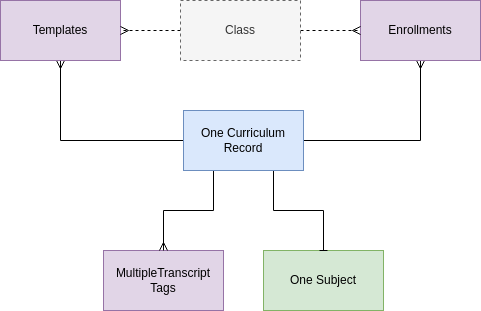
The curriculum record is allowed to be linked to one subject record. This function is added only to allow planners to more quickly identify curriculum that satisfies the class requirements. This field may be used as a filter on drop-down menus for example.
It is important to point out that the 'official' subject for the student's program of study is determined by the class record alone. So if an enrollment record is linked to a class with subject of math, and then linked to a curriculum record with subject English, the student will get math credit for the course.
Enrollment records are linked to the Moodle Course and provide additional information about when the student should start the course (which term and which grade level), the enrollment record triggers auto-enrollment in the Moodle course from PEMS.
Curriculum records are linked to template record in the program of study planning process. One curriculum record may be used in many different templates depending on the program of study.
It is important to note that Curriculum is not directly associated with the Class. This association, and the nature of the association is accomplished only through template and enrollment records.
Fields
Course - the name of the Moodle class as it appears in Moodle. No logic is based on the name.
Code - the key to integration with Moodle, the code must exactly match the Moodle Course ID value.
Top Category - the category the course is filed under in Moodle, not used for any logical purpose at this time. Moodle has specific functions that may be triggered based on the Course Category, these fields are included in the event these activities will be triggered from the SIS.
Sub category 1 - the sub category the course is filed under in Moodle, not used for any logical purpose at this time.
Sub category 2 - the second sub category the course is filed under in Moodle, not used for any logical purpose at this time.
Course Link - the link to the Moodle course
Syllabus - a link to a Syllabus document.
Fill percent threshold 1 and 2. These fields are number fields where the administrator can manage the sections in Moodle.