
Enrollments Table
Relevant Topics
{{@90#bkmrk-this-is-the-list-of-}}
{{@90#bkmrk-curriculum-generall-}}
{{@90#bkmrk-the-term-course-is-n}}
{{@90#bkmrk-in-summary%2C-enrollme}}
{{@90#bkmrk-a-student-term-recor}}
{{@185#bkmrk-moodle-course-id-is-}}
{{@185#bkmrk-sections-are-used-to}}
Enrollments Table Overview
The enrollment record is key to tracking the courses a student takes, when they take them, and what grade the received in the course. The enrollment record is created and managed in the SIS, but controls all the information needed to automate the enrollment of the student in the correct Moodle course. The enrollment record also contains the correct information to be displayed on the student transcripts.
Data Relationships
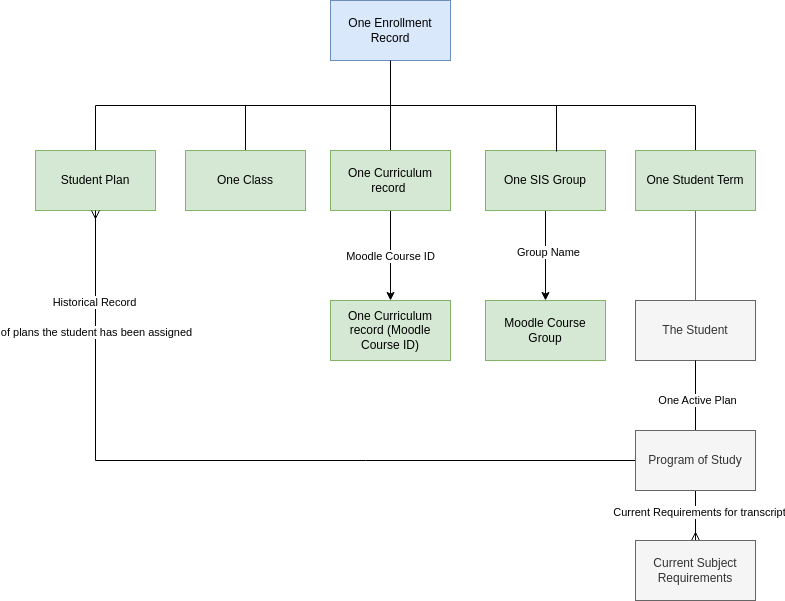
Enrollment records are created by mapping information from the template records associated with the assigned plan. They are not linked to the template records. Enrollment records are also linked directly to the student plan record. The student plan records functions as a historical log of what plan the student took and when the enrollment was taken.
Note: Jan 2024 the enrollment is incorrectly linked to the Program plan record, not the student plan record.
Fields
Status - the status of the student in the class. Active is enrolled in Moodle Course and working towards completion, completed is the end of the term after the grade has been entered from Moodle, planned is an enrollment record that was made for a future enrollment, suspended if the student was suspended from school, dropped if the student dropped the enrollment after starting the class. Plan change drop if the reason for the drop was an assignment of a new plan.
- "Not selected" option is no longer required and should be deprecated.
Letter Grade - The letter grade is selected from a pick list created and updated from the Marks System table - 'Letter Mark' field' in the schools module. There is no need to link to the Marks System table, this field just uses a list from the defined records.
Numeric Grade - If letter grades are not used, then numeric grades can be typed in. Numeric grades do not need to use the mark system table. Change the name of this field to Grade Points.
Weighted Points - entered from the Marks System table according to Marking Rules described below.
Alternate Grade Points - entered from the Marks System table according to Marking Rules described below.
Alternate Weighted Grade Points - entered from the Marks System table according to Marking Rules described below.
Grade Import - the raw grade imported from Moodle.
At grade - the grade level the student is at when taking the course.
Units Attempted - the number of units this course will award. The class record has the number of attempted units for this enrollment.
Units Earned - the number of units earned. A passing grade is required for all units.
Actual Start Date - sometimes students start coursed mid-term. The actual start date is the day the student was granted access in Moodle to the course.
Grading Workflow Summary
To mark the enrollment complete, the user fetches the grade from the associated Moodle course, then sets the status to complete in the enrollment status field. The student's dis-enrollment from the Moodle course is then triggered.
All completed enrollment records appear on the student's transcript.
Create Enrollment Records Workflow Summary
When a student is assigned a plan, the enrollment records are created from information in the template records associated to the assigned plan. By creating all future as well as current term enrollments, the student can be auto-enrolled in Moodle courses without further user action. The user selects the student’s plan, and then the enrollment records are created.
This approach allows the user to easily see what classes the student has left to take in order to complete the program by looking at all incomplete enrollments. Student progress towards graduation is very difficult to assess with most traditional Student Information Systems.
For the current term, the students are auto-enrolled in Moodle. Students are not enrolled in Moodle courses for any future terms.
Enrollment records can only be created if there are student term records and a student plan assigned. To create the enrollments, a plan has to be selected for the student.
Enrollment Marking Rules
The transcript tag on the curriculum related to the enrollment record indicates whether the GPA can be increased (weighted). If it can be increased, then the weighted GPAs are used from the Marks System Table.
The class record controls whether the GPA should be excluded from the standard calculation or the alternate calculation.
When there is a change to Letter Grade field do the following:
Look up the letter grade in the Marks System Tables and
Set Enrollment | Grade Points => Marks System | Grade Points
If Enrollment | Curriculum has ANY associated Transcript Tags | Weight GPA = yes Then
Set Enrollment | Weighted GPA => Marks System | Weighted Grade Points
Else set Enrollment | Weighted GPA => Marks System | Grade Points
If Class | Exclude GPA field = Alternate GPA Then
Set Enrollment | Alternate GPA AND Enrollment | Alternate Weighted GPA to 0.0
ELSE set Enrollment | Alternate GPA AND Enrollment | Alternate Weighted GPA => Marks System | Alternate GPA AND Marks System | Alternate Weighted GPA
If Class | Exclude GPA field = Standard GPA Then
Set Enrollment | Alternate GPA AND Enrollment | Alternate Weighted GPA to 0.0
ELSE set Enrollment | Alternate GPA AND Enrollment | Alternate Weighted GPA => Marks System | Alternate GPA AND Marks System | Alternate Weighted GPA
Action Items Jan 2024
1-MVP | TRANSCRIPT | Create the fields: Weighted Grade Points, Alternate Grade Points, and Alternate Weighted Grade Points in the enrollment record. Change the name of numerical grade field to Grade Point. This will simplify creating the transcript. Change link in enrollment record to student plan, not programs of study.
1-MVP | TRANSCRIPT | Build Marks Rules to input all GPAs based on letter grade.
4-MVP | ADVANCEMENT | In the enrollment table - student plan field is linked to "Program of Study" This field should link to the student plan table. This issue does not affect transcript.
4-MVP | ADVANCEMENT | Status field - remove the option " not selected " (low priority clean up)
2-MVP | HOMEROOM | Deprecate link to Section - this has been replaced with SIS group (clean up)
4-MVP | ADVANCEMENT | Deprecate Curriculum Option, Class Option, Preference and Set (clean up)
2-MVP | HOMEROOM | Add association to SIS Group table, one group per enrollment, groups can be linked to multiple enrollments