
Groups Table
Relevant Topics
{{@90#bkmrk-curriculum-generall-}}
{{@90#bkmrk-the-teacher-of-recor}}
{{@188#bkmrk-where-teachers-are-t}}
{{@185#bkmrk-a-cohort-is-a-group-}}
{{@90#bkmrk-sections-are-a-set-o}}
{{@185#bkmrk-sections-are-used-to}}
Groups Overview
CriticalPEMS must provde a means to allowinglimit thirda partiesproctor's access to theview other student work in Moodle. In Moodle, this feature in only available using Moodle isGroups. the capability to limit the students each third party is allowed to see. Moodle Groups allow teachers (proctors) to see only their assigned students. InA Moodle a groupGroup needs to be created for each course. Then the students and the teacher are assigned to that group.group during the enrollment process. WhenIf properly implement, a teacher views student progress, theyproctor will only see work from studentstudents in the same group as them in that particular course.
Using the Moodle interface, this is a tedious and error-prone process.process Theso Groupthis tablefunction inwill be driven by the SIS isenrollment used to assign the student to a group, then when that student is enrolled in the Moodle course, the student is also added to the correct group.workflow.
In a virtual school, an unlimited number of students may take any online course at anytime. However, the teacher of record is still responsible for grade student work and assign final grades. Too many students in a course can overwhelm any online teacher, especially as some organizations have a requirement for the student to have virtual, synchronous lessons or for the teacher to hold office hours. Group management is used to track and limit the number of students a teacher-of-record must look after.
Data Relationships
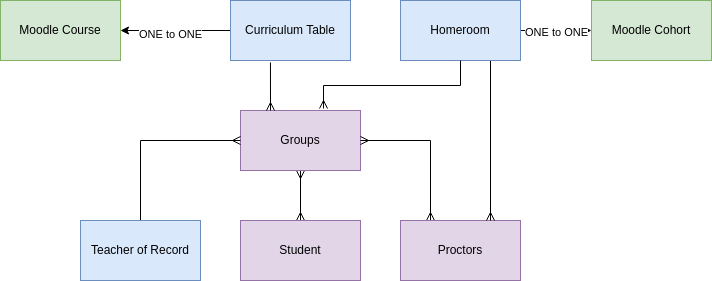
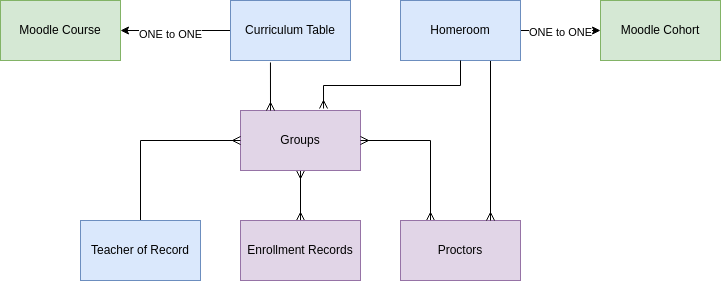
Each curriculum record canwill havebe associate the multiple groups, oneas groupmany linkedgroups toas eachlocations curriculumin record fro every location (homeroom).operation. A location will have multiple student grade levels, any combination of K through 12 students, so the sectionsgroups are not restricted to any specific grade level.
The groups are related to the homeroom. A group can have only one homeroom.
StudentsEach arestudent enrollment records is related to multiple groups and only one homeroom.SIS Group record. Note there is no direct relationship between students, proctors, and Teachers, the relationship is created only through the SIS group record.
As a location (Homeroom) is allowed multiple proctors, multiple proctors can be related to the corresponding group. There is a many to many relationship between proctors and sections,SIS groups, because proctors review multiple courses.
The proctor does not fulfill the regulatory requirements of the teacher of record. There can be only one teacher of record for any class as student takes, so there is only one teacher of record for a group. The teacher of record may be related to multiple groups (for other classes the teacher teaches). The teacher of record is not related to the curriculum record, the teacher is only related to the SIS group record. In relating the teacher to the group record, SIS can better manage the reporting on which specific students took the course under what teacher.
The number of SIS Group records equals the number of Curriculum records time the number of homerooms (locations.)
Fields
Group Name - Concatenate the Homeroom and Moodle Course ID.
Capacity - the maximum number of students allowed in the groupgroup, default to 40.
Action Items JAN 2024
Add - Many to Many relationship to Proctor to current groups table.
Add - Select one teacher of record in the group record
Add - Select one Homeroom in the group- record
ManyAdd to Manyenrollment relationshiprecords - select one group record.
Add the field to students
the Teacher of Record Authorization Status - options are "clear, unauthorized, expiration risk, temporary authorization" (same as the current sections table which will be deprecated)
TheDeprecate the Sections table in the teacher will be deprecated asmodule, its function is replaced by this group table.
The Groups table is now in the schools module, it should be movedmove to the new homeroom module.