
Student Module Overview
Relevant Topics
A grade span covers multiple years of school and can be defined by the administrator. A plan can not exceed a grade span. The purpose of defining grade spans is to help set academic goals and gates.
A grade level is the student's year in school, first grade, second grade, third grade and so on. The term 'grade level is used to differentiate between the grade or mark a student received in a class and the year the student is in.
Schools refer to legal definitions in a jurisdiction of various grade levels. In the US this is Elementary School, grades K through 5, Middle School grades 6 through 8, and high school, grades 9 through 12.
A term is the division of the academic year into grading periods. Terms may be semesters or quarters. The term record is a record that indicates the start and end date of each term. Multiple terms are related to academic years. Terms are also related to a Term Label record.
Enrollment is the process of signing up for a class. An enrollment record in the PEMS is the class as student takes in a specific term, and stores the student's final grade. The set of completed enrollments is the information displayed on the student's transcript.
The plans are sometimes referred to as "Programs of Study." Plans are defined by the administrator as a series of classes taken across all subjects to meet an educational objective or graduation requirements over a grade span. Any number of plans may be developed, and a student may be assigned only one plan at a time. The plan contains the information needed to auto-enroll student in their classes (create enrollment records) in each term covered by the plan.
On the partner's enrollment site, prospective students complete an enrollment form. In that enrollment form, the submitter selects a location. This location in the enrollment is considered a homeroom in PEMS. When a club or organization adds new location, a new homeroom record must be added to the PEMS homeroom table.
Student Module Overview
The primary function of the SIS is to track student information, so the student table is the heart of the solution. One record is created for each student enrolled in the school.
Data Relationships
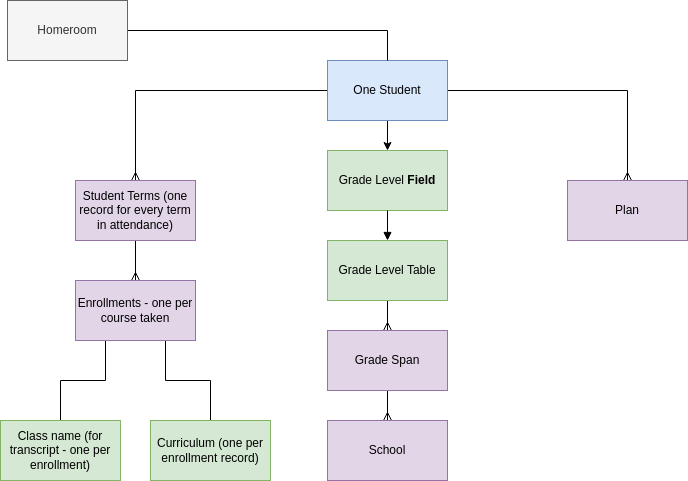
Students are assigned to one homeroom. This homeroom is used to place the student in the correct group in Moodle so that only approved people can see their Moodle progress.
Each student is assigned a program of study, which outlines the classes and the curriculum each student should take in which term, using enrollment template records. As a student completes a plan, they will be assigned a new plan, therefore a student can have multiple related plan records.
Each student is in a grade level, they may enter a number 0 through 12. The grade level is a field in the student record, which allows PEMS to look up and auto-enter the student's school and and grade span.
For every term the student attends the school, PEMS creates a student term record. For example, the school term may be names Fall 2023, but the student term would be Fall 2023 SVG, including the student initials to indicate the record pertains only to that one student.
For every term the student attends the school, the student takes classes or rather, Moodle courses. An enrollment record is created for each class the student takes. The enrollment record specifies the class name that appears on the transcript, the specific curriculum which is the Moodle Course, and in which student term the student is taking that class, and the grade level of the student.
Fields
Name - first, middle and last name from the enrollment form.
Start date - the date the student starts at the school, originally from the enrollment form, then updated as the student completed registration at the school.
Graduation Date - the last day of school the of the last grade level the school offers, calculated by PEMS and updated as the student progresses.
Birth Date - from the enrollment form.
Gender - from the enrollment form.
Dis enrollment date - the last day of school for the student who has transferred out of the school, blank if still enrolled.
Remaining years - PEMS calculates the number of years left to complete all years the school offers.
Enrollment Year Terms - students transfer in anytime during the school year, this is the number of terms the student may complete in their first year of enrollment. For example a school that offers two required terms, fall and spring. A student transfers to the school after the spring term starts. The student completes only one term in the Enrollment year.
School Start Term - a link to the school term in which the student begins at the school.
Current grade level - the grade level of the student which increased every year, unless they are not promoted (failed the year).
Promotion - default to promote. Select repeat if the student's grade level should not be promoted at the end of the academic year.
Student Code - unique ID for each student.
Status - planned for students who have registered but not yet started classes; active for currently enrolled and taking classes, disenrolled for students who have left the school; graduated if graduated, expelled if the student left involuntarily, suspended if the student has their access to the platform suspended with intention to re-instate.
GPA - overall GPA for the grade span the student is currently in.
Weighted GPA - overall weighted GPA for the grade span the student is currently in.
Notes - long text field for discretionary use.
Student First Term - link to the student's first student term record.
Current Program - the active plan the student is currently following.
Action Items JAN 2024
Remove link to Group record - enrollments specify group, not student records
Add link to Homeroom.
Complete and confirm auto-calculation of grade span, school, graduation date, remaining years, enrollment year terms, total remaining terms.
Automation to identify and link to student's to school start term, and student's first term.