
Student Plan Table
Note: student plan and student program are used to mean the exact same table
The student plan table keeps track of what plans have been assigned to the student over time. Student Plan records specify the program of study and keep track of the start date, end date, and status of the plan.
The “Student Program” table keeps the history of what program(plan) the student was completing over the years of study. Every time the current program field in the student record is changed, a record is created in the “student program” table. The “student program” record stores the program(plan) name as well as the planned start and end dates of the program. The student program table acts like a log file of changes made to the ”current program” field in the student record.
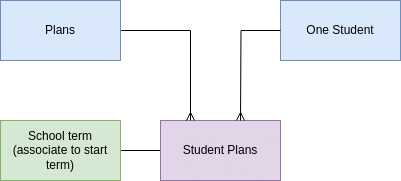
The student programs table stores the association between the plan and the student, basically, which plan was assigned to which student and when. Students will have multiple plans over the course of their time at our school, as they will progress through multiple grade spans.
The student programs table also stores the start and end dates of the plan. For example, if the student was assigned the plan half-way through the term, the exact date the student was assigned the plan is recorded. Based on the start date, PEMS looks up the correct term and automatically associate sthat term into the student program record in the program_start_term field. This table also stores additional information as to how the student is executing their plan.
FieldsData Relationships
Status of the Plan
Fields
Program Status
Active Plans - There can only be one active student plan at any given time.
Suspended Plans - Students may change plans before they are completed, in this case the plan is suspended and a new student plan record created/activated.
Completed Plans - when a student completes all the classed under that plan, the plan is marked completed.
FutureFuture - Student plan records may be made for future grade spans. If the student has a future plan already created, then the student will be auto-enrolled in the next set of classes without any need for user involvement.
Units Required - series of classes, and each class has atotal number of units assignedto tocomplete the class.plan.
Units theCompleted - The units from the related completed enrollment records are summed to determine how many units have been completed under this plan.
Adherence -
Plan GPA
Add- the running GPA fieldof all the enrollments linked to the student plan, Calculatingupdated as the GPAstudents forearn allgrades.
Program associatedstart withdate - the date the plan was started, calculated from the date of the first enrollment record was activated.
Program end date - the date the program was completed, calculated from the last enrollment record or when the status was changed by the administrator.
Program start term - a link to the school term in which the student began the plan.
Action Items JAN 2024
In the Student Plan record, deprecate Units Attempted
Calculate Units completed under the student plan when enrollments are complete, update units completed
Calculate adherence by comparing the units completed in the enrollments to the plan's template records to find if the student is staying on the plan.
Calculate the plan GPA from the completed enrollment records.
Calculate the program start and end dates from the status of the enrollment records.