
Student Records (SIS) Function
Relevant Definitions
{{@90#bkmrk-a-term-is-the-divisi}}
{{@90#bkmrk-a-student-term-recor}}
{{@90#bkmrk-this-is-the-list-of-}}
{{@90#bkmrk-a-transcript-is-a-re}}
The SIS
The Student Information System (SIS) manages all student records, which includes student biographical information like date-of-birth, and parent phone numbers as well as student academic information like that which appears on the student's transcripts. Moodle has course completion information, but not relate those courses to a specific school term.
A student record is created in the SIS for each student that attends the school. The record is created during the student Intake process.
Transcript
The most important function of the SIS is to provide a student transcript. The transcript shows the classes taken in each term by the student, the grades, and calculates the overall grade point average of the student as well as the term grade point average.
The following image shows a typical transcript document:
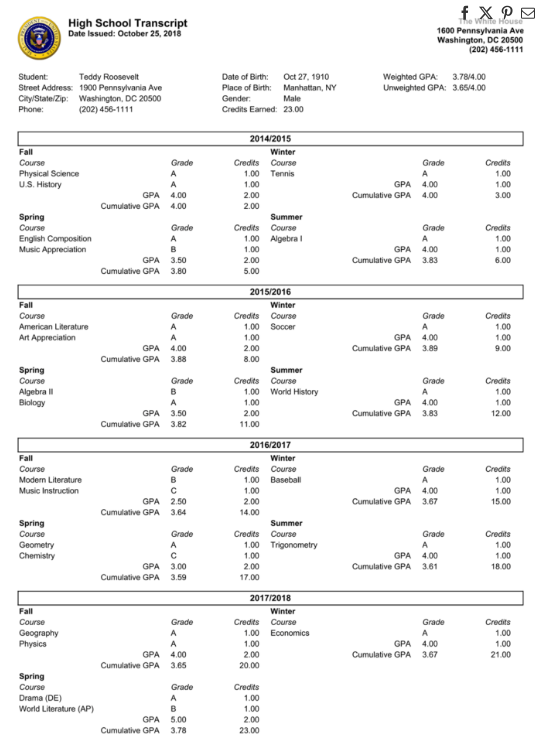
The header contains biographical information. The body of the document shows the specific year and term the classes were taken in and the grade the student achieved. Various Grade-point averages are calculated.
Student Term Records
PEMS develops the information required for the transcript by making a unique record for every grading period (school term) that the student attends the school. A diagram of the data relationship for school terms is shown below:
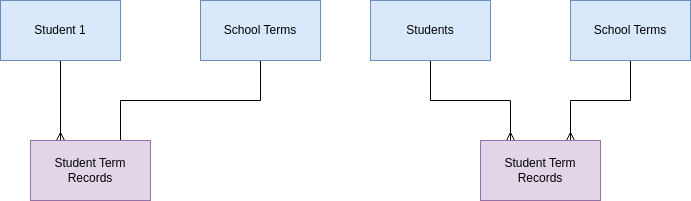
For each individual student, there are multiple student term records. Each student term record is related to only one school term record. However, when all the students are considered, the school term record will be related to multiple student term records, one for each student enrolled in that particular term.
Classes
Students take classes during each term. The classes a student takes are related to the student term record. The grades a student achieves, A, B, C, D etc. are recorded in the class records. Classes appear on the student transcript.
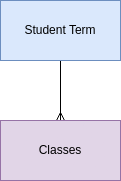
To create the transcript, PEMS creates a report of completed classes sorted by student term.