
Subject and Subject Requirements Tables
Subjects | Subject Requirements
Relevant Definitions
{{@90#bkmrk-subjects-are-familie}}
{{@182#bkmrk-subject-requirements-1}}
{{@90#bkmrk-templates-are-record}}
Data Relationships
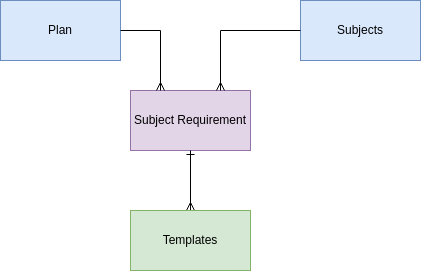
Note that subjects are not associated directly with plans. The subject requirement is the table that links the various subject to the plan and also specifies the number of units in that subject the plan requires.
The template records are linked to the subject requirements when the subject requirement is selected in the template record. The number of units in the template's associated class record contributes to the total required in the subject requirement record. It will take multiple templates to complete a subject requirement.
Subjects Table
The subjects table has only the name field. The administrator can enter unlimited subjects. However, a class record may only be linked to one subject record. Curriculum records are not linked to subject records. A curriculum may be used to fulfill different subjects depending on the plan.
Use Case | Environmental Science - one class may fulfill two different subject requirements
For example, Environmental Science may be frequently used to meet the Biological Science requirement or the Physical Science requirement, but not both. There would be two class records. One called Environmental Science that is linked to the subject of biology and another that is linked to the subject of physical science. However there is just one Moodle course, so there is just one curriculum record. The curriculum therefore does not specify a subject, and is not related to subject records.
Subject Requirements Table
The subjects requirement table specified how many units must be completed under the plan in a particular subject area. Subject requirements are related to only one plan. A Tempalte record fulfills a subject requirement, so it may be related to only one plan.
Note: The use case where a template was able to fulfill multiple subject requirements has been deprecated as it is marginal and there are other ways to address this situation.
Units required - the number of units required for the associated subject under the associated plan.
Name - concatenation of subject, plan, and unit information.
Units plannedPlanned - the number of units in the plan that meet this subject requirement.
Transcript name - the subject requirements are listed in the transcript to create the block of information discussed in the Programs of Study Function. The transcript name is how the subject requirement should appear on the document, as the concatenation name is not convenient for printing.
Action Items JAN 20232024
Enter1-MVP | TRANSCRIPT| Victoria to manually update transcript names in all data. (Add automation that upon new record, auto-enter data for transcript names from subject name, allow user to manually update - thislow ispriority). blank
1-MVP most| records,TRANSCRIPT | The Subject Requirement allows multi-select from the template table. One template should be very similarlinked to only ONE subject namesrequirement. ifRemove notmulti-select exactlyand theallow same.only Considerone adding automationrecord to defaultbe to subject name.selected.
No1-MVP automation| hasTRANSCRIPT| been enabledRoll for Units planned, the sum ofup the units planned in each template the template records also associated to thisthe subject requirement.requirement Units Plan field (summation.