
Suite CRM Integration
Suite CRM is used primary to transmit the necessary documentation required to process a student's enrollment. The application is also used to track new 'homeroom' customers, or new businesses that want to open classrooms. Because we want to market the PEMS as a stand alone product, see the Product Marketing Stragtegy. This integration must be structured as optional.
The approach is used to map the data architecture between PEMS and Suite CRM.
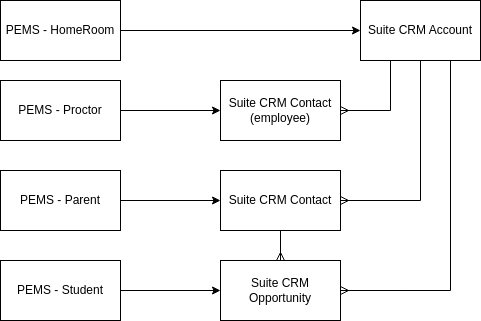
PEMS sends the information from an enrolled student to Suite CRM. Leads from PEMS are not added to Suite CRM.
SuiteCRM is used to manage the B2B business, not student enrollment, hence students are opportunities in PEMS that are created only after the enrollment form is submitted on the website.
However, parents are managed as contacts in SuiteCRM, so when a new student is entered from PEMS into Suite, the primary parent in only created if one is not found.
SuiteCRM is used to transmit the records request to the previous school.
The previous school is typed in the enrollment form, when the student is enrolled, the previous school must be selected from a menu, and if not in the menu, it must be added. The proper name of the previous school must be maintained in PEMS in order to correctly annotate the transcripts.
Merge Contract for Records Request
In order to create a merge pdf, the previous school must also be an account record in Suite CRM. A contract record is created that is linked to the previous school account, the parent contact, and the student opportunity. From this contract, the data in the records request can be entered into the merge pdf.
The list of Previous School in PEMS must be synchronized with the set of Account records that are type of registrars.
This may be accomplished by having the user make any new school records in Suite CRM, and then link to the opportunity record. The opportunity record then updates its corresponding student record in PEMS.
This may also be accomplished by allowing the PEMS user to add new school names, then auto-creating the school name in Suite CRM if it does not exist. This method provides more automation, as the opportunity can be auto-linked to the Suite CRM account record.