
Suite CRM Integration
Suite CRM is used primary to transmit the necessary documentation required to process a student's enrollment. The application is also used to track new 'homeroom' customers, or new businesses that want to open classrooms. Because we want to market the PEMS as a stand alone product, see the Product Marketing Strategy. This integration must be structured as optional.
The approach is used to map the data architecture between PEMS and Suite CRM.
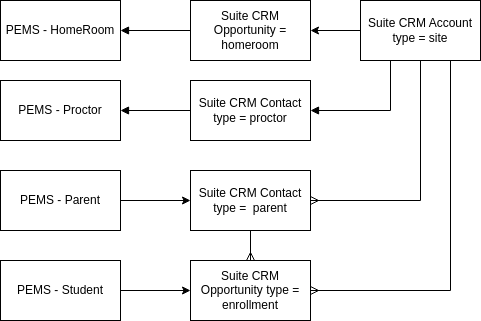
Homeroom (classroom location)
PEMS can enter the homeroom directly when the Suite CRM is not used, but if Suite CRM is implemented, then the homeroom comes from Suite into PEMS.
The master list of homerooms is managed in PEMS. However, the homeroom record first enters the software universe through Suite CRM because a homeroom is a potential client of the School.
The homeroom is an opportunity record with type = homeroom. The opportunity record represents a classroom location linked to an account record with type = facility. A facility can run multiple homerooms, or multiple opportunity records.


The homeroom record is created in PEMS when an opportunity record with type = "homeroom" is closed.
Proctor
There is little need to have the proctors in the Suite CRM. Proctors are employees of the facilities. However a proctor can be an a one-person operation that is both the client and the employee, operating as a small business.
Proctors need to be in PEMS because they must be added to the Moodle Groups in order to view only their assigned students. Like homerooms, proctors begin as records in Suite CRM, if a CRM is being used.
However, a proctor is an account record with contact PEMS type = Proctor.

A proctor is a contact record that should be linked to the homeroom opportunity record and the facility account record. When the opportunity is closed, the proctor record should be made in PEMS.
When a new proctor is added to the closed opportunity record for the homeroom, the proctor is added to PEMS.
If the proctor contact record which is linked to the closed opportunity record for the homeroom is deleted, de-linked, in Suite CRM, the status of the proctor is updated in PEMS. (status fields are TBD).
Student (Enrollment)
PEMS sends the information from an enrolled student to Suite CRM. Student leads go into PEMS from the website, but untill the student is accepted, there is to transmission of information to Suite CRM.
Opportunities records in Suite CRM represent student enrollments in PEMS. They are created only after the enrollment form submitted on the website.
Student Name > Opportunity Name
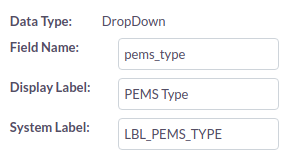
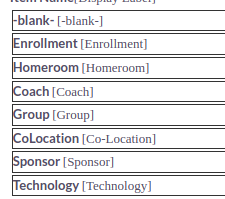
The opportunity type for a student enrollment being entered from PEMS is "Enrollment." The opportunity TYPE field and options are shown below:

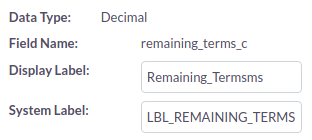
The remaining terms is imported in to Suite CRM so that the total revenue from the enrollment may be calculated. The customer field "Remaining Terms" has been created in Suite CRM.
Parents are contacts in SuiteCRM, so when a new student is entered from PEMS into Suite, the primary parent in only created if a contact record is not found.
Other Schools (Previous School)
In order to create an esign pdf from SuiteCRM, the previous school must also be an account record in Suite CRM. A contract record is created that is linked to the previous school account, the parent contact, and the student opportunity. From this contract, the data in the records request can be entered into the merge pdf.
The list of Previous Schools (Other Schools) in PEMS must be synchronized with the set of Account records that are type of registrars.
PEMS is to be sold as an add-on module to Moodle, and it should not require a CRM to function. Therefore, the list of previous schools must be self-contained in PEMS. When the student is accepted in PEMS, the user must select the correct name from the other schools table based on the text field completed in the enrollment form. The other school record must be entered in the enrollment process in PEMS before the student may be accepted.
When the SuiteCRM integration point is implemented, when every and opportunity record is created for a new student record, then the new other school must also be created as an account record with type = "Registrar". If the record exists already in Suite CRM, then no new other school record will be created.
The following fields are in the PEMS for other schools and should be mapped into the respective SuiteCRM fields.
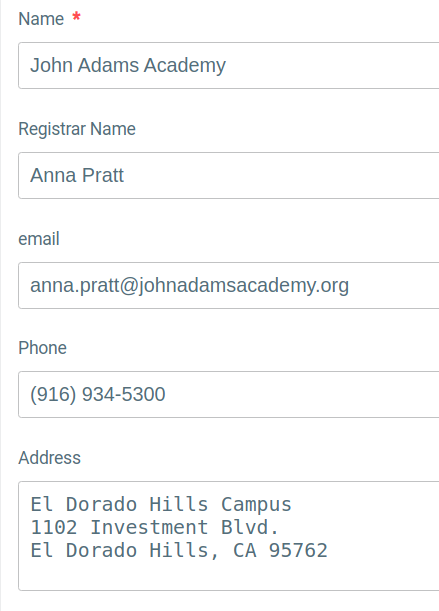
The Name is mapped to the Suite CRM Account Name.
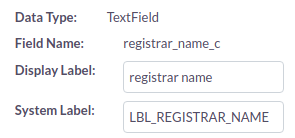
The Registrar name is mapped to the Suite CRM custom text field "Registrar Name"
The address is mapped to SuiteCRM Shipping address.
The email is added as the primary email (email1).
No Comments