
Student Terms Table
Relevant Topics
A term is the division of the academic year into grading periods. Terms may be semesters or quarters. The term record is a record that indicates the start and end date of each term. Multiple terms are related to academic years. Terms are also related to a Term Label record.
Term Labels are the names of the terms a school is running, like Spring, Fall, etc. The number of Term Label records indicates the number of terms the school operates. Term Labels indicate if that term is required or optional, like a summer term.
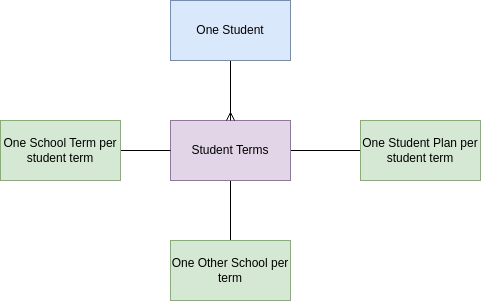
Student Terms. There is one term record for every term the school operates. A student term record contains student-specific information about how the student performed academically in the term, such as the student's grade point average for that term. All the classes a student takes (enrollment records) are linked to the student term. A student has a term record created for each term they are in attendance.
Enrollment is the process of signing up for a class. An enrollment record in the PEMS is the class as student takes in a specific term, and stores the student's final grade. The set of completed enrollments is the information displayed on the student's transcript.
Student Terms Table Overview
Student terms are records created for each student for each term they are enrolled in the school. Where there is one school term record with a specific start and end date, there are multiple student term records with the same start and end date that are related to each individual student. Student Term records are child records to term, and also the student. They describe the many to many relationship between students and terms.
The student term records provide information on the student's academic performance in each school term, and stores the GPA achieved for that term.

Data Relationships
Fields
At Grade - the grade the student is in for that specific term. Student terms can be in the past or made for the future, so the At Grade is different that the student's current grade level.
Student Sequence - the order of the terms the student takes the term.
Term GPA - the calculated GPA for all the courses taken in that term. The term GPA appears on the student's transcript.
Term Weighted GPA - the calculated weighted GPA for all the courses taken in that term. The term GPA appears on the student's transcript.
JAN 2024 the following fields are not created:
Alternate Term GPA - the calculated alternate GPA for all the courses taken in that term. The alternate term GPA appears on the student's transcript.
Alternate Term Weighted GPA - the calculated alternate weighted GPA for all the courses taken in that term. The alternate term GPA appears on the student's transcript.
Student Program - the program/plan the student was assigned during that term.
Units attempted - the number of units of the courses enrolled in during the term.
Units earned - total units the student earned during the term, summed from the courses the student did not drop or fail.
Name - concatenate of Student ID and school term name
Other School - if the term represents coursed taken at a different school, and these courses are recorded in the SIS for the purpose of the Transcript, then the user enters the Other School
JAN 2024 the following field is not created:
Student Term Status - update the status of the student term based on the school term status.
Student Terms Automation
PEMS automatically creates student term records for the student up to the end of the student grade_span. The student's grade span is determined by the student' s grade level.
When the student is completes registration, the student term records are created for the student for the entire grade span.
However, if a student enters in the middle of a grade span, student term records are not automatically created for the past terms of the grade span.
All enrollments are child records to the student term record, and so no enrollments can be made unless there are first student term records created.
Student Term GPA Logic
See 6. Transcript GPA Calculation
| There are four GPA fields to calculate in the student term record. Calculate them all the same, recalculate when ever there is a change in the fields. |
| If enrollment status is complete and if there is a change to any enrollment grade point field, then: |
| For each enrollment, multiply the Grade Points field times the Units Earned field |
| Sum all the values above |
| Sum all the units earned field from associated enrollments. |
| Divide: (Grade Points x Units Earned ) / Units Earned |
| Enter into the respective GPA field in the student term record. |
Action Items JAN 2024
1-MVP | TRANSCRIPT | Add Student term Status, Alternate GPA and Alternate Weighted GPA fields to student term table.
1-MVP | TRANSCRIPT | Calculate all GPAs for the Transcript using the GPA Logic. Update student terms status based on school term status.
No Comments