
Transcript UI
Relevant Concepts
Student Records (SIS) Function provides an overview of what a typical transcript requires. This is the most important aspect of the SIS.
A transcript is a report of completed enrollments. Transcripts are formatted in various ways to use the minimum amount of paper. A transcript shows the classes the student has taken at the school, the grades received and the units earned.
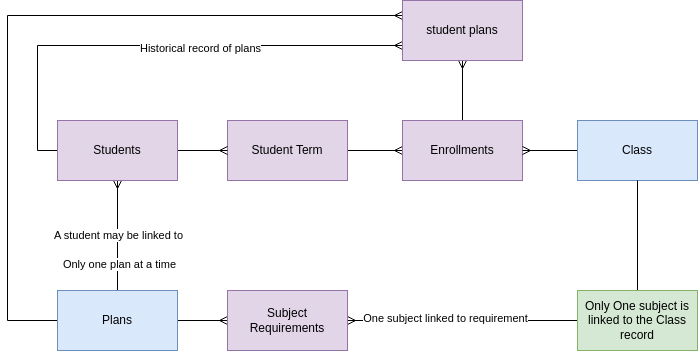
Student Terms. There is one term record for every term the school operates. A student term record contains student-specific information about how the student performed academically in the term, such as the student's grade point average for that term. All the classes a student takes (enrollment records) are linked to the student term. A student has a term record created for each term they are in attendance.
Classes. The name of the Class appears on the student's transcript. Classes are sometimes called courses. However, PEMS does not use the term 'course' in any of its modules. In general, the word 'course' can refer to a specific class, like Algebra 1, or it may also refer to the set of classes that lead to a degree or certificate. For example, "I followed a course at the University in wine making" could mean a series of classes. The world "class" also has a secondary meaning. A student can be in the "second grade class" which would mean all students in a particular classroom. PEMS uses the word class to mean the subject of study for which units are earned, commonly called a course, such as "Algebra I". A class that is a subject of study for units can have different curriculum that fulfill it.
Curriculum generally refers to the books and exercises used by the teacher to further the student's knowledge. In Moodle, the curriculum is a Moodle Course. Any class may be taught with multiple curriculum, or different text books, and so there are multiple Moodle courses that may be used to teach a Class.
Enrollment is the process of signing up for a class. An enrollment record in the PEMS is the class as student takes in a specific term, and stores the student's final grade. The set of completed enrollments is the information displayed on the student's transcript.
Subject requirements are the number of units in total required in a subject area by a regulatory organization. For example, the NCAA may require 4 years of English and 3 years of math. The University of California may require 4 years of English and 4 years of math. The NCAA subject requirement for math is 3 years, the University of California subject requirement for math is 4 years. For University of California, the subject requirement is 4 years, the subject is math. Note: sometimes requirements are described in 'years' of study, sometimes in credits, and sometimes in units.
Compliance tags are used to help manage the different requirements of the various regulatory organizations. Not only do the regulatory organizations specify the subject requirements, they also must each approve the course description (syllabus). Students are not allowed to meet the subject requirements with any curriculum, they must meet the requirements with curriculum that has been submitted and approved to the organizations. The student's transcript must then show that the class & curriculum has been approved by the various regulatory organizations. So compliance is a property of the Moodle Course. The Moodle Course list in PEMS is called the curriculum table. There is one record in the curriculum table for each course available in Moodle. PEMS lets the administrator tag certain curriculum records with a compliance tag. If a student takes a class, English 9A, and is enrolled in a specific curriculum, or Moodle Course, the compliance tag from the associated Moodle course will appear on the transcript. Compliance tags are deliberately short to fit on the transcript pages.
Grade Point Average (GPA). The Grade Point Average is the unit-weighted average of the student's grades. Each class has a number of units (also called credits) assigned. If a student earns an A in a class worth 5 units, the total points awarded for that class is 5 (units) x 4 (points) = 20 points. For a given term all the points are added, then divided by the total units to arrive at the students GPA. In this example, 20 (total points) / 5 (units) = 4.0 GPA.
Weighted GPA. students take more advanced courses, the grade points may be increased. For example, if a student earns a A in an advanced English class of 5 units, the student earns a 5 instead of a 4 for grade points for weighted GPA. The total points for that class is 5 (units) x 5 (points) = 25 points (total). Then divide this by totals (5) for a GPA of 5.0. The higher number of points are used to calculate the student's weighted GPA. Lower number of points (4 instead of 5 points) is used for unweighted GPA.
Data Relationships
Show Enrollments
The transcript shows the student's enrollment records, and the grades in each class. The enrollment records should be organized by student term. The transcript should display all the enrollments associated to the student term.
The enrollment record is linked to a curriculum record. The curriculum record has multiple transcript tags defined. Display the transcript tags next to the enrollment record.
Show Progress to Plan
The transcript must also show progress towards completing subject requirements. The student record is associated with only one Program of Study record (plan) at any given time, the active/current plan. That plan is linked to a set of subject requirements.
The subject requirements are always determined from the active plan, the active plan is the one that is linked to the student record. Students are linked to multiple student plan records, but student plan records are not used in the transcript view.
Each enrollment is linked to one class, which is linked to one subject. Therefore each enrollment has a known subject.
The student is linked to one plan, which has a set of subject requirements. The subject requirements are displayed in the transcript using the 'transcript name' in the subject requirement record. (which is really the same as the linked subject).
The following method is used to find the units earned towards a subject requirement:
*For each subject requirement record, Sum the Units Earned field from the Enrollments that are linked to a class that is linked to the same subject as the subject requirement record.
The following information should be displayed on the bottom of the transcript.
| List subject requirements for student's current plan* | Required | Earned | To Go |
| Subject Requirement : Transcript Name | Subject Requirement : Units required | *sum units earned for enrollments with same subject | Required - Earned, use zero if negative number |
*The current plan is linked in the student record. This field should link to a school 'program of study' not the student's own plan log. As of 21 FEB 2024, there is no link at all in the field, this is only a text field. Alternatively, we can choose to select a current plan from the student plan log.
GPA Calculations Reference Information
| View GoogleSheet Example Calculations of GPA |
| The 6. Transcript GPA Calculation page describes detail on how to make GPA calculations. |
| The Enrollments Table describes the rules to update all the various Grade point fields in the enrollment record. This must be completed in order to run the transcript. |
| The Student Terms Table describes the rules to calculate GPA fields for the student term record. This must be completed in order to run the transcript. |
| The Transcript UI describes how to display Student Terms table GPA calculations as well as the student table GPA calculations on the Transcript. |
| The List of transcript tags to be displayed on the transcript is described in Programs Table. |
| The Marks System table describes how this table is used to allow users to customize the GPA calculations. |
Action Items JAN 2024
1-MVP | TRANSCRIPT | Victoria to complete data set for plans, link plan to student, create a subject requirement under every plan, and complete Marx matrix so that GPAs may be calculated. - DONE
1-MVP | TRANSCRIPT | Complete all other transcript actions in all other pages of the document - see action item summary for complete list.
1-MVP | TRANSCRIPT | Verify the method of calculating student progress is as described.
1-MVP | TRANSCRIPT| Complete the transcript page.
1-MVP | TRANSCRIPT| Provide a means to export to pdf.
1-MVP | TRANSCRIPT| Add filters to top of transcript to filter for only completed student terms, or include all terms.
No Comments