
Templates Table
Relevant Topics
Topics for this page include a review of PEMS Programs Module Overview
Templates Overview
Templates are records that specify the sequence of classes to be taken in the plan. They link a class record to a grade level and term label. This information creates a template for the enrollment records for the student. The enrollment records are create to match the template in the plan.
To create a plan, the administrator makes a Plan record, then adds templates as child records to the plan. The template links a class from the class list to a grade level and term label. For example, a template contains the information that the student will take Algebra 1A in the first term of ninth grade.
When the Student is enrolled in the plan, the PEMS reads the templates associated with the plan and creates a set of enrollment records linked to the appropriate student term. An enrollment record links the student term, the class from the class list, and also contains the student's final grade in the class. The completed enrollment records are displayed on the student's transcript. The status of an enrollment reflects if the course is planned, completed or in progress.
"Template" is short for "Enrollment Template" because these records are essentially copied to create the enrollment records for each student.
Data Relationships
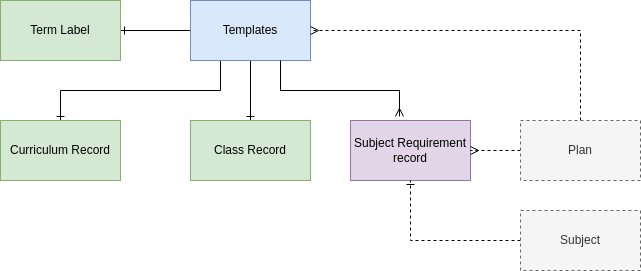
Each template brings together the curriculum, the class, and the subject requirement that that template enrollment should fulfill. Each plan has multiple templates.
The subject requirement record brings together the subject, the plan, and the plan's requirement for units per subject. Subject requirement records are unique to each plan, and so if multiple plans require 20 units of English, then multiple subject requirement record for 20 units of English are need.
The template may be linked to multiple subject requirements, as described in the use case below:
The template is not linked directly to the subject, instead the user selects the subject requirement record. A filter can be used to decrease the options to only those subject requirements that are associated with the plan, and eventually business logic added to prevent any subject requirement record being associated to the template that is not already associated to the same plan as the template.
The term label relations specifies in which academic term the course should be taken. For example, English 9A will be taken in the Fall and English 9B in the Spring term.
Fields
At Grade - the grade level of the student when the template enrollment beings. For example, the honors high school diploma program begins in 9th grade. The At Grade field and the term label pinpoint in which student term to enroll the student in the associated Moodle course.
Fields to Deprecate JAN 2024
4-MVP | ADVANCEMENT| Deprecate Set, Options, Curriculum Option - these fields were going to be used to allow the student to select between options. Instead, the administrator will create multiple plans to fit every scenario. The number of options are in fact a very limited use case. (low priority clean up).
4-MVP | ADVANCEMENT | Deprecate Subject, total units in this subject - by linking instead to the subject requirement, there is no need to store the subject in the template record.
Action Items JAN 2024
Per Subject and Subject Requirements Tables Action Item: 1-MVP | TRANSCRIPT | REDUNDANT | The Subject Requirement CURRENTLY allows multi-select from the template table. ONLY ONE template should be linked to ONLY ONE subject requirement. REMOVE multi-select and allow only one record to be selected.
1-MVP | TRANSCRIPT | The subject requirements field is currently multi-select, change this to single select so there is only one subject requirement record linked to any template. There is a minor use case that would require one class to fulfill multiple subject requirements under a plan. This use case will be eliminated as there may be a work around with how the plans are crafted.
Use Case | Multi-select subject requirements - Deprecate
A student may take an elective course to satisfy both science requirements and elective total units. For example, programming is not required, this course may be used to satisfy science requirements, but also be used to fulfill general electives. In this case the template for Programming would fulfill 5 units of science AND 5 units of general elective. The alternative is to simple reduce the number of electives required under the plan.
No Comments