
Homeroom Module Overview
Relevant Topics
The Studia Nova Business Model is unique in the industry in that it encourages third parties to set up physical classroom locations for students to gather while Studia Nova, the private school of record, provides the virtual curriculum and record keeping. At these different locations, students can be any grade level and a single teacher can be trained to manage a mixed group of various grade levels. However, each location can be a separate client, and so it is essential that each location only see the student information pertaining to its own students.
Virtual learning allows families and communities to re-group themselves in unique ways to help students achieve their online learning goals. Read more about One Room School Houses. PEMS is configured to allow third parties to participate in the learning process. A homeroom can be a tutoring club with computers where students come to learn, or a homeroom may be a family with multiple students learning from home.
Terminology
In real life, a cohort is a set of students at a specific grade level. All ninth graders in 2023 form a set of students, as they move through the various grade levels, we refer to those 2024 ninth graders as a cohort. In Moodle a cohort is a set of students and a teacher(s). Cohorts are primarily used in Moodle for batch enrollment. For the use case that all students in 4th grade should be enrolled in 4th grade math. In this case a Moodle user would define a cohort of 4th graders, then assign the cohort to a specific course. However, using cohorts for enrollment is not useful in PEMS because each student is following a unique program. The unique program is managed in the SIS. In PEMS, all fourth graders are not enrolled in fourth grade math. However, cohorts are still useful for reporting. So in PEMS, Moodle Cohorts are used to identify a set of students under the supervision of a particular teacher (proctor). In this use case, students can be at any grade level since PEMS is designed for mixed grade-level student management. Unfortunately, Moodle Cohorts can not be used to block a teacher from seeing other student's work who are not in their own cohort. In summary 1) Moodle Cohorts are a set of students and their teachers (proctors) 2) the students in the set can be any grade level 3) Cohorts are useful for reporting 4) All teachers can see all students in any cohort.
In real life, Sections are a set of students taking a particular class. In a standard brick and mortar school, a sections are like the physical classroom. There may be multiple teachers teaching English 9 in a school, each with their own physical classroom number. There are no traditional sections in the PEMS universe since there is no needs to physically separate students into various classrooms. However, students from multiple learning locations can all be enrolled in the same Moodle Course, and only their own teacher should see their work. So PEMS uses the term groups to refer to a set of students assigned to a specific teacher. In Summary: 1) PEMS does not use the term sections. 2) Instead Moodle uses the term (virtual) groups.
In Moodle, Groups are used to break up groups of students enrolled in a course. Moodle can enroll hundreds of students in one course, but the teacher would be overwhelmed to grade all the work. Therefore Moodle provides the group option. When teachers and their students are enrolled in the same group, the teacher only sees their own students. In PEMS, Moodle groups are used to block teachers from seeing students that belong to a different location. However, Moodel groups are not defined at the system level in Moodle, they must be defined in each and every course. In Summary: 1) Moodle uses Groups to hide students enrolled in the same course from other teachers. 2) Both the teacher and the student have to be in the same group. 3) Groups MUST be defined for each and every course, Groups can not be defined at the system level.
Enrollment is the process of signing up for a class. An enrollment record in the PEMS is the class as student takes in a specific term, and stores the student's final grade. The set of completed enrollments is the information displayed on the student's transcript.
Why is the text for Relevant Topics and Terminology showing up in that code when it is in editing mode? Not that it's ultimately a big deal.
From the definition, cohorts and groups can be easily confused. They seem to have the same definition.
Problem of teachers being able to see the record of students who aren't in their cohort can be changed manually right? If so, that should be mentioned.
The Homeroom
Homerooms are a group of students under the supervision of a proctor. Homerooms are also Studia Nova's B2B clients. The Freedom Library Club (FLC) is the first homeroom client. Nova Schools is a second client.
An organization, club, or business may have multiple locations, but the client is provided a single recruitment website. Each physical location must identify at least one proctor to supervise the on-site students. Homerooms are the individual locations. the group of students under an identified proctor.
On the partner's enrollment site, prospective students complete an enrollment form. In that enrollment form, the submitter selects a location. This location in the enrollment is considered a homeroom in PEMS. When a club or organization adds new location, a new homeroom record must be added to the PEMS homeroom table.
In summary, homerooms are locations where students gather under the supervision of a proctor. The proctor grades the assignments submitted only by their students.
I'm tracking that proctors can only be assigned to one homeroom, and can review the work of students in their group. Teachers still have more administrative power, and proctors in the definition sound like a version of a TA; helping take load off of teacher.
Proctors
Where teachers are the qualified and certificated individuals that overlook many virtual students, PEMS allows proctors to supervise students and review their work in Moodle, helping to keep students on track. Proctors are not allowed any access to the SIS, but they are provided limited access to Moodle, and in this way, only see the work of their own group of students. Proctors may be volunteers working in a tutoring club setting, or may simple be a home school parent managing their own student's progress. A homeroom can have multiple proctors, but a proctors may only be assigned to one homeroom.
In summary, a proctor should only grade the assignments of their own students. A proctor does not required teacher certifications.
Groups
The Moodle Groups function is the only option to provide the capability to block teachers from seeing students that do not belong to them. Therefore, when the SIS enrolls a student in the Moodle Course, the SIS must have all the information required to create the Moodle Group at the course level, then add that student to the group.
To accomplish this requirement, the SIS has a groups table that mirrors the Moodle Groups. A Moodle course has multiple groups (one group for each homeroom). When a student is enrolled in the course, the student is assign to the group that corresponds to the student's homeroom.
Data Relationships
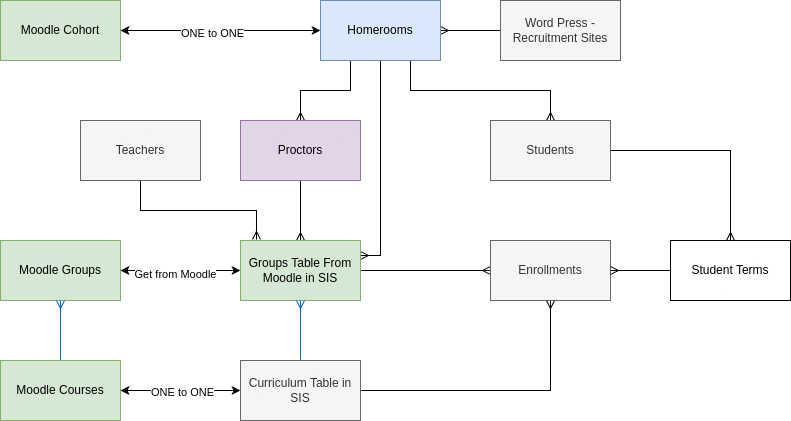
Note: above diagram shows one to many for proctors to Home rooms - this should be many to many.
The organization is provided a Word Press recruitment website, which allows students to enroll on their branded website. The website may have multiple locations. Each location from all the recruitment websites correspond to one homeroom record.
For every homeroom record there is a corresponding Moodle cohort. A Moodle cohorts do not limit proctors from seeing other student, but Moodle does provide cohort-level reporting, and so reporting for proctors is easier with cohorts.
^Confusing sentence about Moodle cohorts not limiting proctors from seeing other students. Other students from different groups, cohorts?
Each homeroom must have at least one Proctor. A homeroom is allowed multiple proctors, but a proctor may only be assigned to one homeroom.
Students are assigned to only one homeroom, there can be multiple students in a homeroom.
Only the Moodle Groups feature is able to limit which students a proctor can review. Groups must be defined in each and every course. The SIS Group table directly corresponds to Moodle Groups.
For example, a homeroom name might be FLC-Placerville, for a location run by the FLC organization. If there are 40 curriculum records, there will be 40 SIS Group records with the name of FLC-Placerville, but each SIS group record is linked to a unique curriculum record. While the groups and cohorts have the exact same name, they are very different types of records.
Reading up to this point, group vs cohort is still a little confusing for reader.
The SIS creates an enrollment record for each Moodle Course a student takes. With the implementation of the Homeroom Module, each enrollment record has a SIS group record identified. When that student is enrolled in the Moodle course, the enrollment record communicates to Moodle which group to put the student in.
Homeroom Module Workflow
When a new client is on-boarded, homeroom records are created for their launch locations. When they add a location, the client submits a form to the SIS, once approved, a new homeroom record is created.
As the client operates, the client adds and deletes proctors. The client submits a form to add a proctor and when approved, the SIS adds the proctor to the proctor table.
When new students are enrolled into the school, their student record is linked to the homeroom record that is specified in their enrollment form.
When students are assigned their classes, PEMS creates enrollment records in the SIS, one enrollment record for each class they take. The enrollment record specify the curriculum (Moodle Course) and is associated to the student term, which is linked to only one student.
When it is time to enroll students in their Moodle courses, the administrator triggers their enrollment based on their enrollment records. The enrollment record includes the name of the SIS Group, and so the student is assigned to the correct group in Moodle in the correct course.
So students in the same virtual school who are taking different classes can have the same teacher? The students in the same school, but taking different curriculums to fulfill the same requirement would be in different groups but the same cohort?
Action Items JAN 2024
1-MVP | HOMEROOM | Move the 'define groups' table from the school module to the Homeroom module
No Comments