
Academic Years Table
Calendar Module Data Relationship
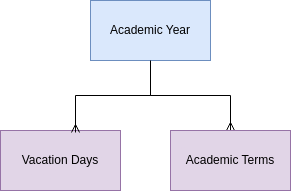
Academic Years Table
An Academic Year record represents a single year the school is in operation. It has a calendar start date and end date. There is one record for each year in operation. The Programs of Study module requires sufficient academic year records to plan out the courses students will take until they graduate.
When a student transfers into Studia Nova, the student's previous records need to be articulated, which means the process that one school goes through to award credit to the student for taking classes at another school. Therefore, there needs to be sufficient past academic years so that any new student's previous classes can be entered in the year they took them.
Future academic years are required.
Past academic years are required.
Academic Years have a status field with options of past, future, or current. Also, based on the total number of vacations days, the academic year record calculates the total days in the academic year. This is important since there are many regulations that specify the total number of days in an academic year.
Fields
- The user enters year name, start year, end year, start date, end date, and sequence.
- PEMS calculates school days, vacation days.
- PEMS updates the status of the year based on the calendar.
Action Items JAN 2024
4-MVP | ADVANCEMENT | Automatically create a new academic year record on the promotion date (school configuration variable)
4-MVP | ADVANCEMENT | Automatically update current and next academic year status.
| Calendar Functions | Not started |
1.0 Calculate field Values for Calendar Tables |
| Purpose | After the user enters vacation days, and configures start dated, PEMS calculates the number of days in a term. | |
| Trigger | Recalculate anytime there is a change to any records used to make these calculations upon save | |
| Conditions | Initial configuration was completed. | |
| Sequence |
These functions may be run anytime there is a new school term record. need some way to limit how many times this is recalculated. |
|
| Step 1 |
For each new School Term record, calculate the number of calendar days between the start and end dates, excluding the days specified in the associated Term Label record. Enter result in School Term calendar days. |
|
| Step 2 | For each School Term, count the number of associated Vacation Days records with status = activated. | |
| Step 3 | Calculate School Term school days by subtracting the number of vacation days found above from the school days, enter as School Term calendar days | |
| Step 4 | Academic Year school days is the sum of the associated School Term school days. | |
| Step 5 | Academic Year calendar days is the sum of the associated School Term calendar days. | |
| END |
No Comments