
Programs Table
The Program of Study Table contains the plan records. There can be any number of plans created in PEMS, however none of the plans allow any selection of classes. For example, to enter University of California, students need to follow the "a-g" plan, with a specific list of classes that must be taken. The University does not care if the foreign language requirement is met with a course of Spanish or French. Two plans must be create, one that enrolls the student in the Spanish option,, and one that enrolls the student in the French option, with all other classes the same.
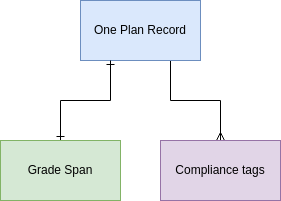
Plans can not be associated with any specific academic year or term. So the plan specified what grade year / grade level the student begins the plan, for example, the plan begins in 9th grade and is completed in the 12th grade. Each plan must be linked to only one grade span, and the plan can not exceed the grade span.
When defining the grade spans, schools must consider the maximum duration of a plan. For high school, many plans are 4-year plans as the student has all 4 years to meet the requirements. So the grade span for high school must be 4 years.
Plans are tagged with the same compliance tags as the individual curriculum records. If all approved courses are taken the plan should meet all compliance requirements.
Data Relationships
Fields
Build status shows whether the administrator has completed building and quality controlling the plan. The administrator will want to ensure all courses are approved and completed in the LMS before marking the plan published. The plan should not be available for selection or assignment is not published.
Start and end grade - numeric values of the grade levels where the plan begins and ends. For example a high school plan begins at grade 9 and ends at grade 12.
Total Terms - the total terms under the plan, which would default to the total number of required school terms. The administrator can edit the total terms to include optional summer terms. Once summer terms are added to the plan, they are no longer optional for the student in order to be compliant with the plan.
Max Classes - the total number of classes as student may take in this plan. Some schools limit workload. If to many classes are assigned to the plan, the user interface is meant to reflect the maximum has been reached.
The Units Planned is the total sum of units so far added to the plan via template records (units are in the class associated with the template record).
The Units Required is the units the plan requires. Plans may exceed the number of units required by the various regulatory agencies, but the units planned is less than the units required, the user interfaces should alert the administrator.
Action Items JAN 2024
3-MVP | INTAKE | No logic to filter for only published plans has been specified in any of the user interfaces.
NV | PLAN UI | Max classes is not operational in any user interface.
NV | PLAN UI | Units planned and units required is not operational .
No Comments