
Terms Table
Relevent Topics
A term is the division of the academic year into grading periods. Terms may be semesters or quarters. The term record is a record that indicates the start and end date of each term. Multiple terms are related to academic years. Terms are also related to a Term Label record.
Term Labels are the names of the terms a school is running, like Spring, Fall, etc. The number of Term Label records indicates the number of terms the school operates. Term Labels indicate if that term is required or optional, like a summer term.
School Terms (Terms)
Academic terms may be semester, quarters, or any division that the school determines to break up a grading period of the academic year. A record is required for every term the school operates, and for past academic years in order to properly enter the a transfer student's transcripts.
Every class a student takes in taken is a specific academic term. Academic terms are related to the academic years, so they can not be created if there is no academic year in the system.
In manual operation, The user links the term record to an academic year record by selecting the record. PEMS will implement automation so that school term records are auto-created.
School Terms Actual Start/End Dates
The user specifies a start date and end date for every academic year. In the term label record, the user specifies the general day and month that each term is starts and ends. Based on this information term school records are created. After these school term records are created, the user can adjust the specific days of each school term. Future records that have not been updated are considered estimated start days.
Data Relationships
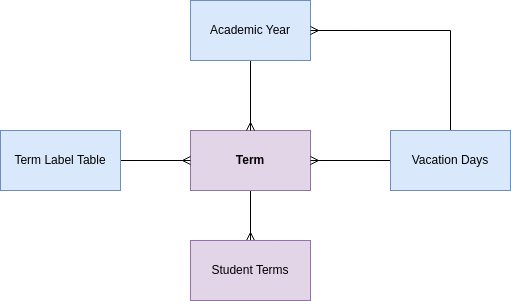
The term record is related to a term label record. A term label record stores the name of the term, fall, spring and the attributes common to all terms.
Fields
Start year, end year are the same as the academic year the term is related to, auto-entered by PEMS.
The start date and end date mark the actual dates the term starts and end. When new term records are automatically created The start date of the first term of the year is the same as the start date of the related academic year.
Using the term label record and the year of the term start date, the PEMS concatenates the Term name, "Fall 2020"
The ordinate is user-entered and is the order the terms take place in aggregate.
Calendar days and school days are calculated based on the vacation day records.
Flag is inherited from the term label record and is needed to help PEMS determine if the term is the first term of the year or the last term of the year. This is used in other algorithms in PEMS.
Action items JAN 2024
4-MVP | ADVANCEMENT| Auto-create term records every time a new academic year record is created per 1.3 Automatically Create School Term Records
| Calendar Functions | Not started |
1.2 Automatically Update Status of Academic Years. |
| Purpose | Academic Year records have a status of current, past, or future, update the status of the records automatically when the user-defined promotion date has been reached. | |
| Trigger | Managed by the Promotion WorkFlow | |
| Conditions | There can be only one current year. | |
| Sequence | This step is best triggered after the next future record has been made and in accordance with the PROMOTION workflow. | |
| Step 1 | Set previous current academic year status to 'past' | |
| Step 2 | Set next year, based on ordinate to current. | |
| END |
No Comments