
Suite CRM Integration
Suite CRM is used primary to transmit the necessary documentation required to process a student's enrollment. The application is also used to track new 'homeroom' customers, or new businesses that want to open classrooms. Because we want to market the PEMS as a stand alone product, see the Product Marketing StragtegyStrategy. This integration must be structured as optional.
The approach is used to map the data architecture between PEMS and Suite CRM.
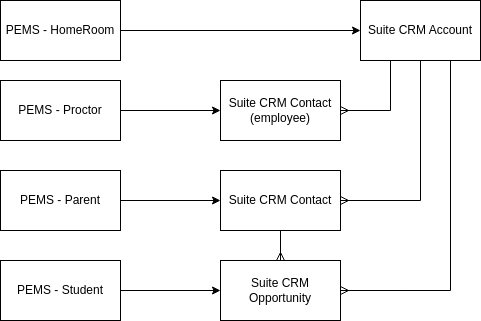
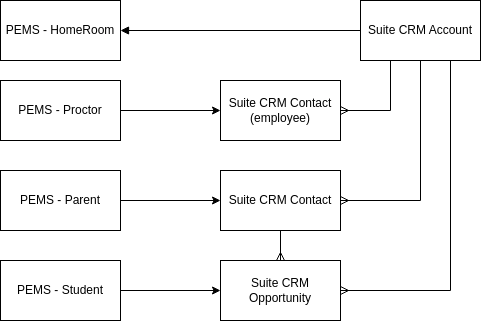
Homeroom (classroom location)
The master list of homerooms is managed in PEMS. However, the Homeroom record first enters the universe through Suite CRM because a Homeroom is a potential client of the School.
PEMS can enter the homeroom directly when the Suite CRM is not used, but if Suite CRM is implemented, then the homeroom comes from Suite into PEMS.
The homeroom is a account record with type = "homeroom"
The homeroom record is created in PEMS when an opportunity record with type = "Homeroom" that is linked to the account is closed.
Student (Enrollment)
PEMS sends the information from an enrolled student to Suite CRM. LeadsStudent leads go into PEMS from PEMSthe arewebsite, notbut addeduntill the student is accepted, there is to transmission of information to Suite CRM.
SuiteCRMOpportunities isrecords usedin toSuite manageCRM the B2B business, notrepresent student enrollment, hence students are opportunitiesenrollments in PEMSPEMS. thatThey are created only after the enrollment form is submitted on the website.
However, parents
Student Name > Opportunity Name
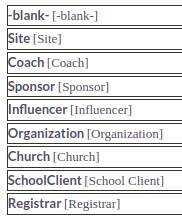
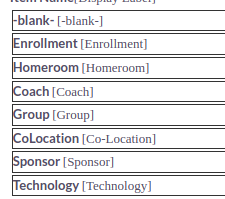
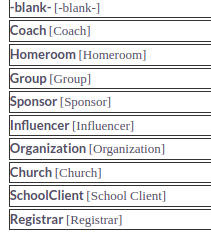
The opportunity type for a student enrollment being entered from PEMS is "Enrollment." The opportunity TYPE field and options are managedshown asbelow:

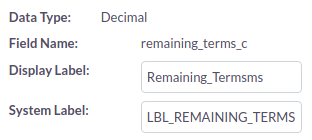
The remaining terms is imported in to Suite CRM so that the total revenue from the enrollment may be calculated. The customer field "Remaining Terms" has been created in Suite CRM.
Parents are contacts in SuiteCRM, so when a new student is entered from PEMS into Suite, the primary parent in only created if onea contact record is not found.
SuiteCRM
is used to transmit the records request to the previous school.
The previous school is typed in the enrollment form, when the student is enrolled, the previous school must be selected from a menu, and if not in the menu, it must be added. The proper name of the previous school must be maintained in PEMS in order to correctly annotate the transcripts.
MergeOther ContractSchools for(Previous Records RequestSchool)
In order to create aan mergeesign pdf,pdf from SuiteCRM, the previous school must also be an account record in Suite CRM. A contract record is created that is linked to the previous school account, the parent contact, and the student opportunity. From this contract, the data in the records request can be entered into the merge pdf.
The list of Previous SchoolSchools (Other Schools) in PEMS must be synchronized with the set of Account records that are type of registrars.
ThisPEMS is to be sold as an add-on module to Moodle, and it should not require a CRM to function. Therefore, the list of previous schools must be self-contained in PEMS. When the student is accepted in PEMS, the user must select the correct name from the other schools table based on the text field completed in the enrollment form. The other school record must be entered in the enrollment process in PEMS before the student may be accomplishedaccepted.
When the userSuiteCRM makeintegration anypoint is implemented, when every and opportunity record is created for a new student record, then the new other school recordsmust also be created as an account record with type = "Registrar". If the record exists already in Suite CRM, and then linkno tonew theother opportunity record. The opportunityschool record thenwill updatesbe its corresponding student record in PEMS.created.
This may
accomplished
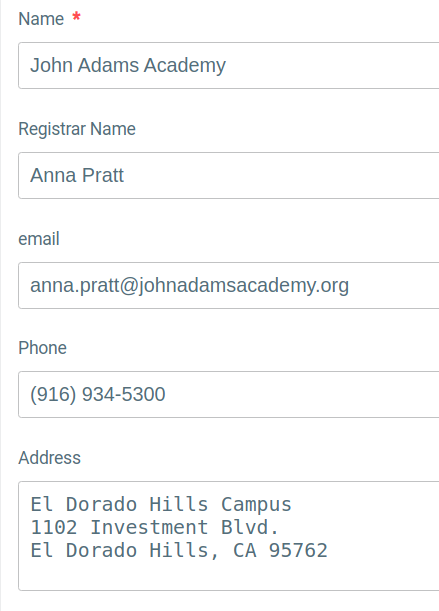
The allowingfollowing fields are in the PEMS userfor toother addschools newand schoolshould names,be thenmapped auto-creatinginto the schoolrespective nameSuiteCRM infields.
if
The doesName notis exist. This method provides more automation, as the opportunity can be auto-linkedmapped to the Suite CRM accountAccount record.Name.
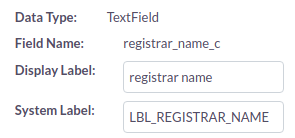
The Registrar name is mapped to the Suite CRM custom text field "Registrar Name"
The address is mapped to SuiteCRM Shipping address.
The email is added as the primary email (email1).