
Setting Up Any Desk
How to Install Any Desk on Unbuntu
Change to root:
sudo -i
Step 1. Add Anydesk repository key to the Trusted software providers list.
wget -qO - https://keys.anydesk.com/repos/DEB-GPG-KEY | apt-key add -
Step 2. Now add the repository to the sources list.
Below command will put the repository entry in a new file under /etc/apt/sources.list.d/ directory.
* Execute as single command
echo "deb http://deb.anydesk.com/ all main" > /etc/apt/sources.list.d/anydesk-stable.list
Step 3. Update the apt cache by running below command.
apt update
Step 4. Now install the software. This command will download and install Anydesk from repository along with dependencies.
apt install anydesk
Issues
After installing AnyDesk, the following error is presented:
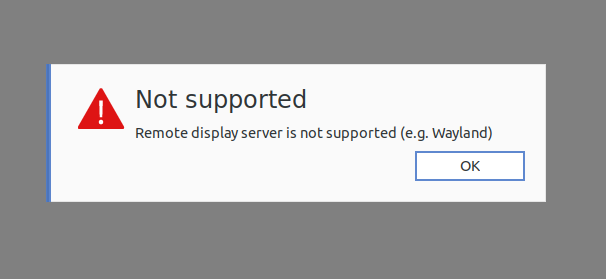
To fix the problem, we have to edit a file.
sudo gedit /etc/gdm3/custom.conf
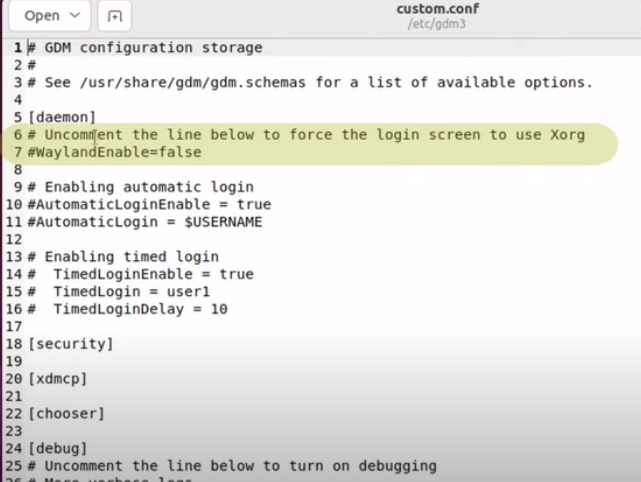
- Uncomment line 7 "WaylandEnable=false"
- Uncomment line 10 "AutomaticLoginEnable = true"
- Uncomment line 11 "AutomaticLogin = $USERNAME" (note change to $USERNAME if a different value was there)
No Comments