
Transcript UI
Relevant Concepts
Student Records (SIS) Function provides an overview of what a typical transcript requires. This is the most important aspect of the SIS.
{{@90#bkmrk-a-transcript-is-a-re}}
{{@90#bkmrk-a-student-term-recor}}
{{@90#bkmrk-this-is-the-list-of-}}
{{@90#bkmrk-curriculum-generall-}}
{{@90#bkmrk-in-summary%2C-enrollme}}
{{@90#bkmrk-subject-requirements-1}}
{{@90#bkmrk-not-only-do-the-regu}}
{{@90#bkmrk-the-grade-point-aver}}
{{@90#bkmrk-if-students-take-mor}}
Data Relationships
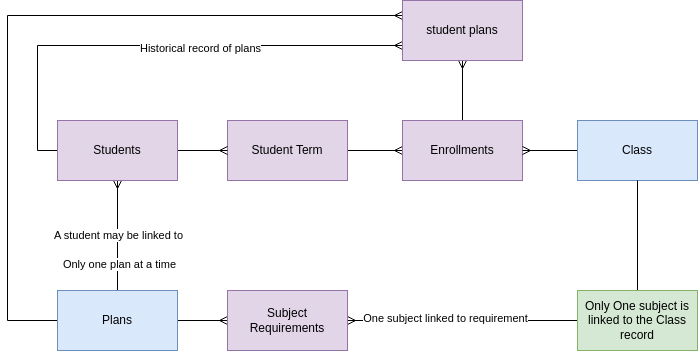
Show Enrollments
The transcript shows the student's enrollment records, and the grades in each class. The enrollment records should be organized by student term. The transcript should display all all the enrollments associated to the student term.
The enrollment record is linked to a curriculum record. The curriculum record has multiple transcript tags defined. Display the transcript tags next to the enrollment record.
Show Progress to Plan
The transcript must also show progress towards completing subject requirements. The student record is associated with only one Program of Study record (plan) at any given time, the active/current plan. That plan is linked to a set of subject requirements.
The subject requirements are always determined from the active plan, the active plan is the one that is linked to the student record. Students are linked to multiple student plan records, but student plan records are not used in the transcript view.
Each enrollment is linked to one class, which is linked to one subject. Therefore each enrollment has a known subject.
The student is linked to one plan, which has a set of subject requirements. The subject requirements are displayed in the transcript using the 'transcript name' in the subject requirement record. (which is really the same as the linked subject).
The following method is used to find the units earned towards a subject requirement:
*For each subject requirement record, Sum the Units Earned field from the Enrollments that are linked to a class that is linked to the same subject as the subject requirement record.
The following information should be displayed on the bottom of the transcript.
| List subject requirements linked to plan that is linked to student | Required | Earned | To Go |
| Subject Requirement | Transcript Name | Subject Requirement | Units required | *sum units earned for enrollments with same subject | Required - Earned, use zero is negative number |
GPA Calculations Reference Information
| View GoogleSheet Example Calculations of GPA |
| The 6. Transcript GPA Calculation |
| The Enrollments Table describes the rules to update all the various Grade point fields in the enrollment record. |
| The Student Terms Table describes the rules to calculate GPA fields for the student term record. This must be completed in order to run the transcript. |
| The Transcript UI describes how to display Student Terms table GPA calculations as well as the student table GPA calculations on the Transcript. |
| The List of transcript tags to be displayed on the transcript is described in Programs Table. |
| The Marks System table describes how this table is used to allow users to customize the GPA calculations. |
Action Items JAN 2024
1-MVP | TRANSCRIPT | Victoria to complete data set for plans, link plan to student, create a subject requirement under every plan, and complete Marx matrix so that GPAs may be calculated.
1-MVP | TRANSCRIPT | Complete all other transcript actions in all other pages of the document - see action item summary for complete list.
1-MVP | TRANSCRIPT | Verify the method of calculating student progress is as described.
1-MVP | TRANSCRIPT| Complete the transcript page.
1-MVP | TRANSCRIPT| Provide a means to export to pdf.
1-MVP | TRANSCRIPT| Add filters to top of transcript to filter for only completed student terms, or include all terms.